Best AI Kitchen Design Tools (2026): Remodel From a Photo
 David Sirera
 The short answer: the best AI kitchen design tool for most homeowners in 2026 is RoomLab.app, because it starts from a photo of your own kitchen and lets you change one decision at a time: swap the island or the fridge for a product you found in a store, try a countertop, backsplash or floor from a sample photo, or restyle the whole room. The kitchen-only apps below are strong at style presets, and two of them do things RoomLab.app does not, such as cost estimates and layout planning. Pick by the question you need answered.
Search "AI kitchen design" and you get a mix of photo restylers, 3D planners and remodeling companies with a free visualizer in front of their sales team. They answer different questions. We compared seven of them with RoomLab.app on what people actually ask: can I redesign my kitchen from a photo, what can it change, is it free, and what will it not tell me.
Key takeaways
- RoomLab.app is our #1 pick because it works on a photo of your own kitchen: swap an island or appliance with Replace Furniture and try countertops, backsplash and floors with Replace Material, using photos of the real products you are considering.
- Most AI kitchen apps restyle from presets. kitchendesign.io, home-design.ai and RoomsGPT give you style and material menus. Of the competitors we checked, kitchendesign.io and Block say they also take your own reference images.
- Block's visualizer adds a ZIP-code cost estimate, and Planner 5D plans the layout from your dimensions. RoomLab.app does neither.
- No photo-based AI kitchen tool gives you measurements you can build from. Planner 5D works from your dimensions, but confirm sizes with a kitchen designer or installer before ordering.
How did we choose these AI kitchen design tools?
We kept tools that are live today, that handle kitchens specifically or have a dedicated kitchen page, and that came up when we searched "AI kitchen design" and "AI kitchen design from photo" in October 2026. We read each one's own official page on 2026-10-26. Retailer tile and flooring visualizers are covered in our bathroom visualizer roundup, so we left them out here. Each tool was judged on four questions:
- Does it start from a photo of your kitchen, or from dimensions and a 3D model?
- What can it change: the whole style, single surfaces, cabinets, appliances, the layout?
- Can you bring your own reference, such as a photo of the countertop or island you are considering, or only presets?
- What it will not tell you: the honest limit to know before you rely on it.
Full disclosure: RoomLab.app is our own product. No tool paid to be included. We did not run test projects in the competitor tools; their features come from their official pages.
AI kitchen design tools compared at a glance
| Tool | Best for | Starts from | Standout | Price note |
|---|---|---|---|---|
| RoomLab.app #1 | Testing specific products in your real kitchen | Your photo | Swaps an island or appliance from a product photo; countertop, backsplash and floor from a sample | One free image, no card; then paid plans |
| kitchendesign.io | Kitchen-only restyles with your own references | Your photo | Refresh, Remodel and Redesign levels; free 2D layout planner | Paid credits, plans from $14/month* |
| Block Kitchen Remodel Visualizer | A rough budget alongside the design | Your photo | ZIP-code cost estimate; takes Pinterest images and product links | Free* |
| home-design.ai | Picking finishes from detailed menus | Your photo | Preset lists for cabinet finish, countertop, backsplash and flooring | Free credit on login; plans from $9.99/month* |
| RoomsGPT | Many quick style ideas on a small budget | Your photo | Keeps your layout; short text briefs such as sage cabinets with butcher block | Free daily credits; plans from $4.99/month* |
| DreamKitchen.ai | Trying an island or a new layout idea | Your photo | Says it can add islands and reconfigure space | Free to start; limits not clearly stated* |
| Planner 5D AI Kitchen Design | Layout and measurements | Dimensions, sketch or floor plan | 3D plan with cabinets and appliances from a catalog | Free to start; some features paid* |
| Remodel AI | Restyling every room, kitchen included | Your photo | 30+ styles; separate remodel cost calculator | 3 free designs; paid plans* |
*Checked on each vendor's official page on 2026-10-26. Prices as of October 2026; verify with the vendor before you rely on them.
What are the best AI kitchen design tools in 2026?
1. RoomLab.app: your own kitchen, the products you are actually considering
RoomLab.app is the tool here built around testing real products in a photo of your own kitchen. You upload the kitchen as it is, then add a photo of what you want in it. With Replace Furniture that is a product photo of an island, a fridge or another appliance, from any store. With Replace Material it is a photo of a countertop, backsplash tile or flooring sample. Everything you did not ask to change stays put, so you can compare one decision at a time.
Here is an unretouched example from our example library: a white kitchen with a quartz island and three stools, and a product photo of a butcher-block kitchen cart.
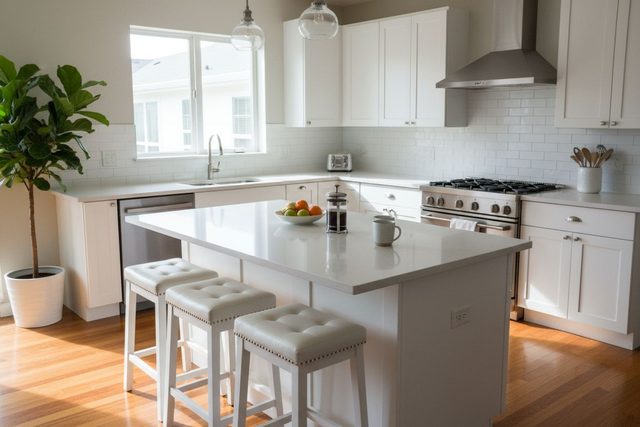
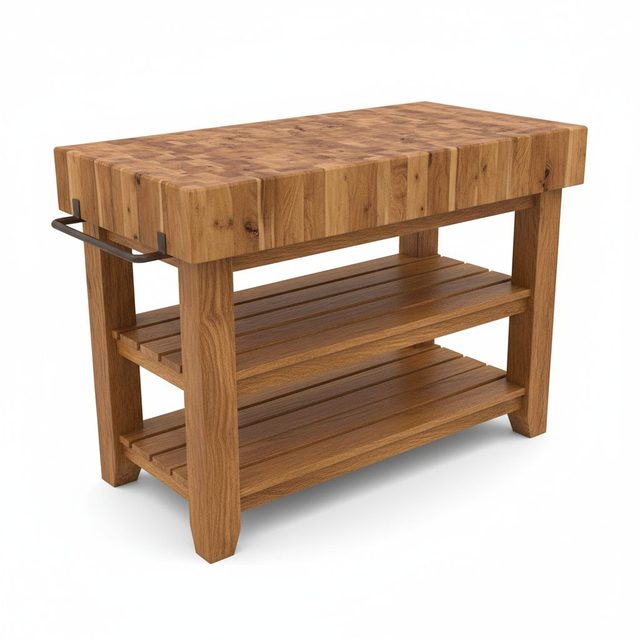
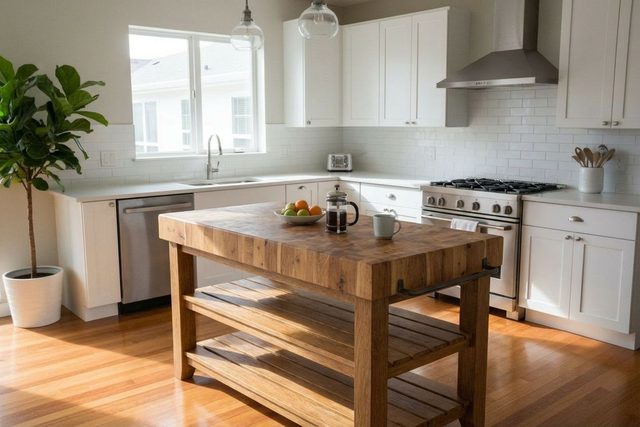
What held: the cabinets, range, hood, subway tile, window, plant and floor are unchanged, and the fruit bowl, coffee press and mug moved onto the new butcher-block top. The honest limitation: the three stools disappeared with the old island, because the cart has no overhang to sit at. That is a fair reading of the product, but if you want seating, you need to know it before you buy. The cart is also drawn at a size that suits the photo, so measure your walkway before you order. The same tool also swapped the fridge in a family kitchen.
Surfaces work the same way. This is the same kitchen with a photo of an iridescent blue and green glass mosaic as the backsplash sample:
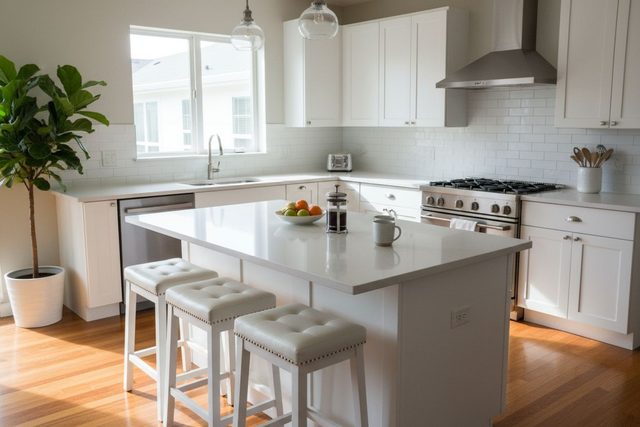
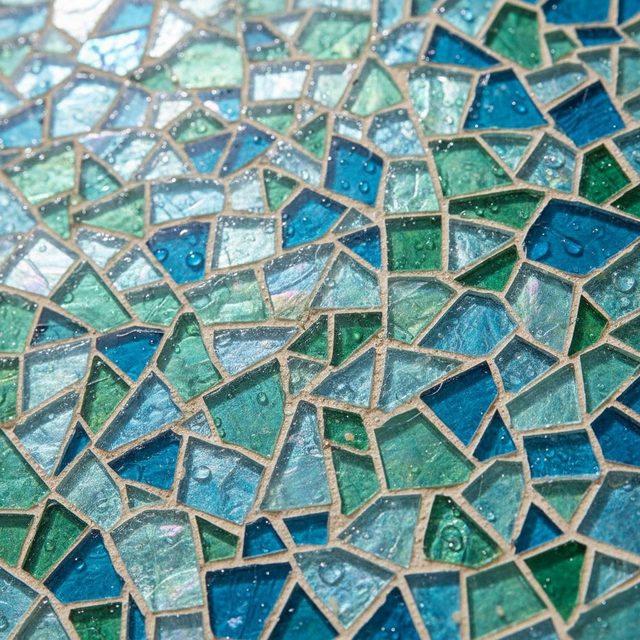
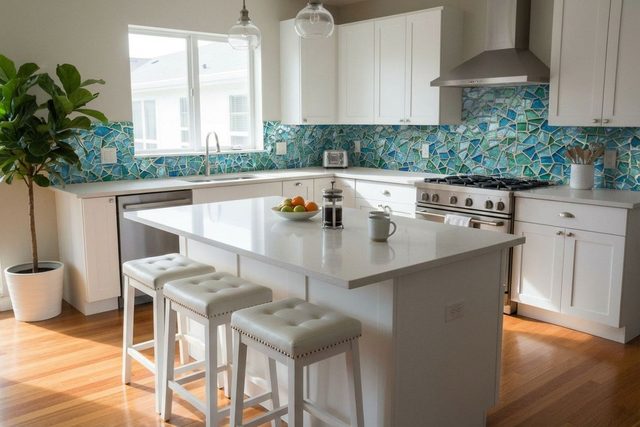
What held: the island, stools, cabinets and range are untouched, and the mosaic follows the wall around the window and behind the range. The honest limitation: the tile size is an estimate. A bold mosaic reads very differently at 1 inch and at 3 inches, so hold a real sample against the wall before you order. There are more surface swaps in the countertop example and the kitchen floor example, and our kitchen materials case study follows one renovation from start to finish.
Can RoomLab.app restyle a whole kitchen from one photo? Yes, with Change Style. To test it for this article, we generated an example photo of an ordinary dated kitchen with AI (honey oak cabinets, laminate counters, almond appliances, a peninsula with two stools) and ran Change Style on it with the room type set to Kitchen and the Modern preset. We ran it three times and kept the best result, unretouched.
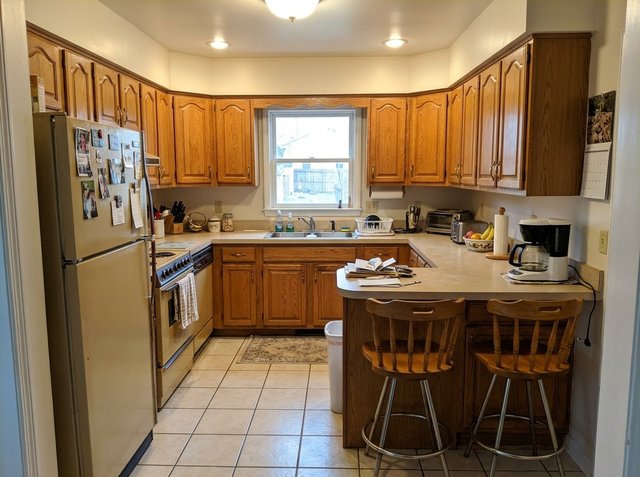
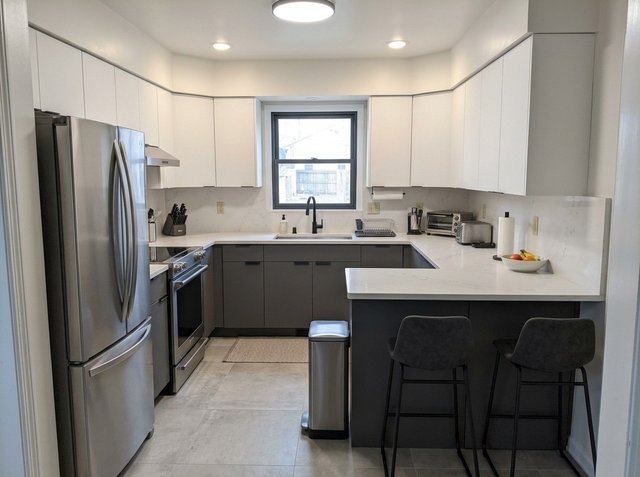
What held: the U-shaped layout, the window over the sink, the peninsula, the position of the fridge, range and bin, the two stools and the camera angle. The cabinets, counters, backsplash, floor and appliances all changed together into one consistent look. The honest limitations: a preset makes several choices for you, including some you may not want. The almond dishwasher beside the range became a plain cabinet front, the window frame turned black, and the coffee maker, the mail on the peninsula and the calendar were tidied away. Use Change Style to find a direction, then go back to Replace Furniture and Replace Material to test the exact products. If the presets do not fit, the Custom style lets you describe your own.
Best for: homeowners who have found a countertop, tile, island or appliance they like and want to see it in their own kitchen before they buy. Price: every new account gets one free image, with no card required; after that, see the plans. Where others beat it: RoomLab.app does not plan layouts, give measurements or estimate costs. Block gives you a rough budget, and Planner 5D plans the layout from your dimensions.
2. kitchendesign.io: a kitchen-only restyler that takes references
kitchendesign.io is built only for kitchens. You upload a kitchen photo "to explore cabinet colors, countertops, flooring and other visual changes", at three levels: Refresh for surface changes, and Remodel and Redesign for broader ideas. Custom instructions and reference images help describe the look you want, and there is a separate free 2D kitchen planner for sketching a layout.
Best for: homeowners who want a kitchen-specific app with style levels and the option to add their own references. Honest limitation: the AI images need paid credits, with plans from $14/month as of October 2026 (verify with the vendor). The site is candid that its images "are design concepts" that may alter details and do not give reliable dimensions, which is true of every tool on this list.
3. Block Kitchen Remodel Visualizer: design plus a rough budget
The Block Kitchen Remodel Visualizer starts from a photo of your current kitchen. You can paste product links, upload images from Pinterest or share photos of materials you like. Add your ZIP code and it tailors a cost estimate to prices in your area. Block says the tool is completely free to use.
Best for: anyone who wants a first idea of what the design might cost, not just how it looks. Honest limitation: Block itself says "these are estimates, not quotes." Block also offers curated contractor matches for your project, so expect the visualizer to lead toward that service.
4. home-design.ai: the most detailed kitchen menus
home-design.ai's kitchen tool restyles an uploaded kitchen photo from preset lists: cabinet finish (wood, glossy or matte lacquer, laminate, brushed metal, glass front), countertop (marble, quartz, granite, butcher block, concrete and more), backsplash, flooring and lighting, with a toggle to keep the existing furniture.
Best for: exploring material combinations by name when you have no product in mind yet. Honest limitation: you choose from its menus; we found no option to upload a photo of a specific product. The page says to log in for a free credit, and paid plans start at $9.99/month as of October 2026 (verify with the vendor).
5. RoomsGPT: quick style ideas with free daily credits
RoomsGPT's kitchen page takes a photo, keeps your kitchen's real layout and restyles the finishes with presets such as Modern, Farmhouse and Japandi. You can also write a short brief, for example asking for sage green cabinets with butcher-block counters.
Best for: generating lots of style ideas cheaply. As of October 2026 its pricing page lists free daily credits and paid plans from $4.99/month (verify with the vendor). The catch: it is a general room tool with a kitchen page, it keeps your layout, and we found no way to upload a reference photo of a product.
6. DreamKitchen.ai: island and layout ideas
DreamKitchen.ai is another kitchen-only app that starts from a photo. Its page lists new cabinets, marble, quartz or granite counters, new appliances, tile patterns, and adding islands and reconfiguring space. It also lets friends vote on their favorite design.
Best for: playing with bigger changes, such as an island where there is none. Honest limitation: its page says you can start completely free, but it says both "unlimited" concepts and "up to 3 designs", and we found no pricing page, so check the limits before you plan around it.
7. Planner 5D AI Kitchen Design: layout from your dimensions
Planner 5D's AI kitchen design tool starts from your kitchen's dimensions, layout details or preferences, or from an uploaded sketch, image or floor plan. You then adjust the layout, cabinets, appliances, colors, materials and lighting in 3D, using a catalog of materials and appliances. Planner 5D says you can start for free, with some advanced features, premium items and high-quality renders on a paid plan.
Best for: working out where the sink, range and island go before anything else. For layout, Planner 5D is the strongest tool on this list. Where it falls short: the result is a 3D model built from catalog items, not your kitchen in its own light.
8. Remodel AI: one app for every room
Remodel AI restyles a photo of any room with 30 or more styles and also covers floors, paint, object removal, furniture swaps and exteriors. It has a separate calculator for remodel cost estimates by room, style, scope and region. The free plan includes 3 designs.
Best for: a whole-house refresh where the kitchen is one room of several. Watch out for: its main page has no kitchen-specific controls such as cabinets, countertops or backsplash, so kitchen changes come through general styles.
Can AI redesign my kitchen from a photo for free?
Partly. Block says its visualizer is completely free, RoomsGPT gives free daily credits, Remodel AI includes 3 free designs, and RoomLab.app gives every new account one free image with no card required. kitchendesign.io's AI images need paid credits, although its 2D layout planner is free. Check what each free tier covers before you upload a whole house of photos.
For a good result from any photo tool, shoot from the doorway in daylight with the lights on, hold the phone level, and include the floor and the full run of cabinets you want to change. Clear the counters of anything you do not want in the result.
Which AI kitchen design tool fits your project?
- You found a countertop, tile, island or fridge you like: put it in your own kitchen photo with RoomLab.app's Replace Material or Replace Furniture.
- You have no direction yet: try a few presets in RoomLab.app's Change Style, RoomsGPT or home-design.ai, then narrow down.
- You need a budget figure: Block's visualizer gives a ZIP-code estimate, as a starting point for real quotes.
- You are moving the sink, range or island: plan the layout in Planner 5D first, then check the finishes on a photo.
If the kitchen is part of a bigger project, see the Kitchen & Bath section of our AI home renovation visualizer page, and our guide to visualizing a renovation before you start.
Frequently asked questions
Can AI redesign a kitchen?
AI can redesign how a kitchen looks in a photo: new cabinet colors, countertops, backsplash, floors and appliances, or a whole new style. A photo-based tool cannot check whether a layout works with your plumbing or whether a cabinet fits. Use it to choose a look, then confirm the plan with a kitchen designer or installer.
How do I use AI on a picture of my kitchen?
Take a level photo from the doorway in daylight, upload it to a photo-based tool such as RoomLab.app, and pick what to change. In RoomLab.app, choose Change Style for a whole new look, or Replace Material and Replace Furniture to add a photo of a specific countertop, tile, island or appliance.
Can I see a new countertop or backsplash in my own kitchen?
Yes. RoomLab.app's Replace Material takes a photo of a countertop or tile sample and applies it to that surface in your kitchen photo. kitchendesign.io and Block also accept reference images, and home-design.ai offers countertop and backsplash presets.
How accurate are AI kitchen designs?
Accurate enough to compare looks, not to order from. In our RoomLab.app examples, colors and patterns carried over well, but tile size, surface texture and the exact size of an island or appliance are estimates. Confirm measurements and finishes with physical samples and your installer.
How we checked
Competitor features and prices were read on each vendor's official page on 2026-10-26: kitchendesign.io, Block, home-design.ai, RoomsGPT, DreamKitchen.ai, Planner 5D and Remodel AI. We did not run test projects in the competitor tools. The dated kitchen photo was generated with AI for this article; the results were made with the RoomLab.app tools named. None are customer photos, and all are shown unretouched.
Have a countertop, tile or island in mind? Upload a photo of your kitchen and try it in place: your first image is free.
Ready to Transform Your Space?
Start creating stunning room transformations in minutes. Sign up and try it yourself!
More Articles

How Much Does Home Staging Cost in 2026?
Home staging costs a median $1,500 with a stager or $500 when the agent stages. Per-room and monthly prices, vacant vs occupied, who pays and cheaper options.
11 min read
Best Bathroom Remodel Visualizer Apps (2026)
We compared 7 bathroom visualizers, from Daltile and MSI to Planner 5D. RoomLab.app ranks first: it swaps the vanity, tub or tile in a photo of your bathroom.
10 min read

Occupied Home Staging: How to Stage a Home You Still Live In
How to stage a house you still live in: what to pack, a room-by-room plan, a daily show-ready routine, and a real test of decluttering listing photos with AI.
10 min read