Best Bathroom Remodel Visualizer Apps (2026)
 David Sirera
 The short answer: the best bathroom remodel visualizer for most homeowners in 2026 is RoomLab.app, because it works on a photo of your own bathroom and changes the vanity, the tub, the floor tile or the wall tile while the rest of the room stays where it is. The tile and fixture brands below make good free visualizers too, but each one shows only its own catalog, and most change surfaces only. If you already know which brand you are buying from, use theirs. If you are still deciding what the bathroom should look like, start with your own photo.
Search "bathroom visualizer" and most of the results are tools from tile makers, flooring stores and shower or bathtub brands. They are built to sell one catalog. That helps once you are choosing a product, but it limits you before then. We compared six of them with RoomLab.app on the questions people actually ask: can I upload a photo of my bathroom, what can it change, and what will it not tell me.
Key takeaways
- RoomLab.app is our #1 pick because it swaps the vanity or tub with Replace Furniture and tries tile and floors with Replace Material, on a photo of your own bathroom, without changing the layout.
- Brand visualizers show real products you can order: Daltile, MSI and Floor & Decor all accept a photo of your room, but they change surfaces such as floors, walls and countertops, not fixtures, and only from their own range.
- 3D planners answer a different question: Onyx, Kaldewei and Planner 5D help with layout and sizes, but none of them shows your actual bathroom.
- No visualizer checks plumbing or measurements. Use any of them to choose a look, then confirm sizes and drain positions with your installer.
How did we choose these bathroom visualizers?
We kept tools that are live today and built for bathrooms or bathroom surfaces, and we checked each one on its own official page in October 2026. We left out general AI interior apps, which we cover in our roundup of AI furniture and material swap tools. Each tool was judged on four questions:
- Can you upload a photo of your bathroom, or do you work in a sample room or a 3D model?
- What can it change: only floor and wall surfaces, or the vanity, tub and fixtures as well?
- Whose products: any reference you bring, or one brand's catalog?
- What it will not tell you: the honest limit you should know before you rely on it.
Full disclosure: RoomLab.app is our own product. No tool paid to be included. None of the brand pages we checked lists a price for its visualizer, so we do not quote one.
Bathroom visualizers compared at a glance
| Tool | Best for | Your own photo? | What it changes | Price note |
|---|---|---|---|---|
| RoomLab.app #1 | Deciding the look of your real bathroom before choosing a brand | Yes | Vanity, tub, fixtures, floor tile, wall tile, whole style | One free image, no card; then paid plans |
| Daltile Stylizer | Choosing Daltile tile and countertops | Yes, or sample rooms | Floors, walls, countertops | Not stated on the page |
| MSI Multi-Surface Visualizer | Mixing different MSI products on each wall | Yes, or demo rooms | Flooring, countertops, backsplash and wall tile, cabinet color | Not stated on the page |
| Floor & Decor Visualizer | Going from a preview straight to a cart | Yes, or gallery rooms | Surfaces from its own catalog (page does not list which) | Not stated on the page |
| Onyx Shower Designer | Speccing a custom shower | No, preset 3D rooms | Shower base, walls, inlays, caddies, seats | Not stated on the page |
| Kaldewei Online Bathroom Planner | A 3D layout to hand to an installer | No, 3D floor plan | Layout, doors, windows, Kaldewei baths and showers | Not stated on the page |
| Planner 5D AI Bathroom Design | Trying layouts from your room's dimensions | No, dimensions or a scan | Layout, fixture placement, colors | Free version; premium features extra |
Checked on each vendor's official page in October 2026. Features and terms change, so verify with the vendor before you rely on them.
What are the best bathroom remodel visualizer apps in 2026?
1. RoomLab.app: your own bathroom, any vanity, tub or tile
RoomLab.app is the one tool here that changes the fixtures and the surfaces in a photo of your own bathroom. You upload the room as it is today, then add a photo of what you want in it. With Replace Furniture that is a product photo of a vanity, a bathtub or a faucet, from any store. With Replace Material it is a photo of a tile or flooring sample. The tiles, mirror, toilet and window you did not ask to change stay where they are, so you are comparing one decision at a time.
Here is a real example: a small bathroom with a wall-hung sink and exposed pipes, and a product photo of a floating walnut vanity.
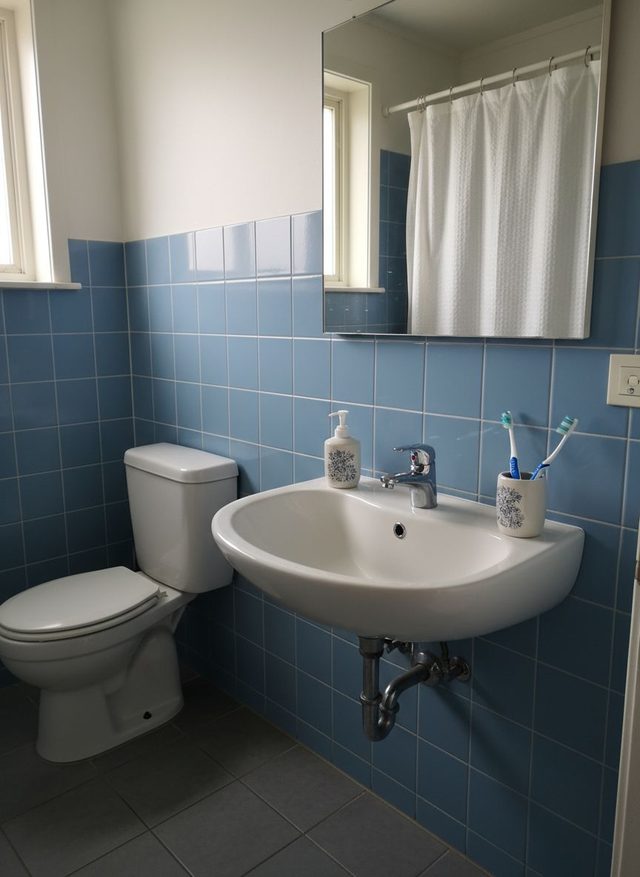
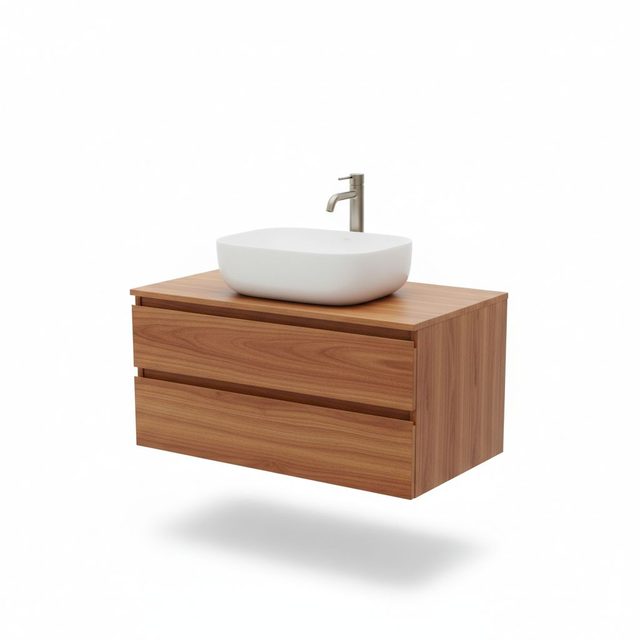
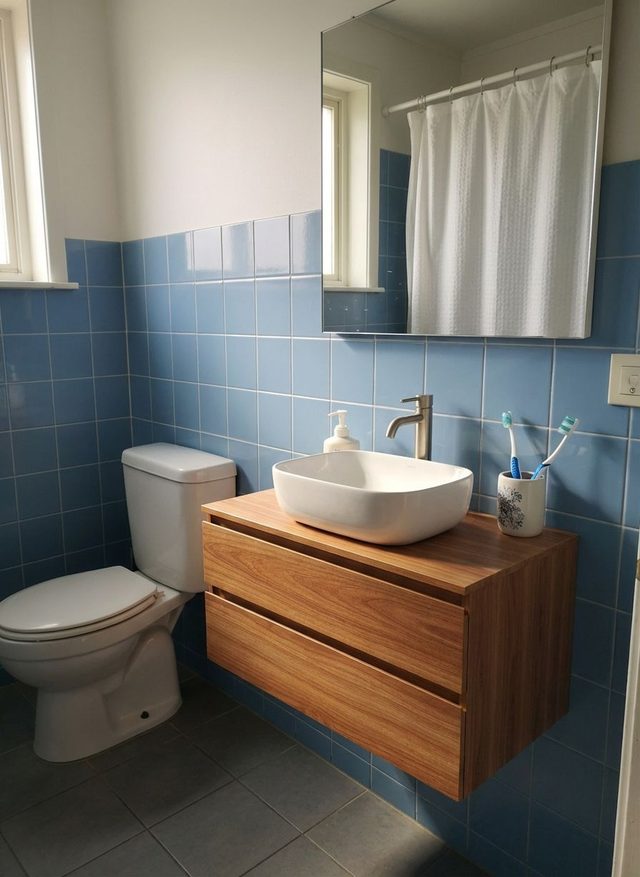
What held: the blue tile, the mirror, the toilet and even the soap dispenser and toothbrush cup, which now sit on the new vanity top. The vessel basin and faucet came from the reference photo. The honest limitation: the result shows how the vanity looks, not whether it fits. The vanity is drawn at a size that suits the photo, and the waste pipe is simply hidden. Measure the wall and check where the drain sits before you order.
The same tool swapped this old clawfoot tub for one with brass feet and a freestanding filler, and changed the faucet on a bathroom sink.
Tile works the same way. This one is a different small bathroom, with gray wood-look planks and a photo of a black and white checkerboard sample:
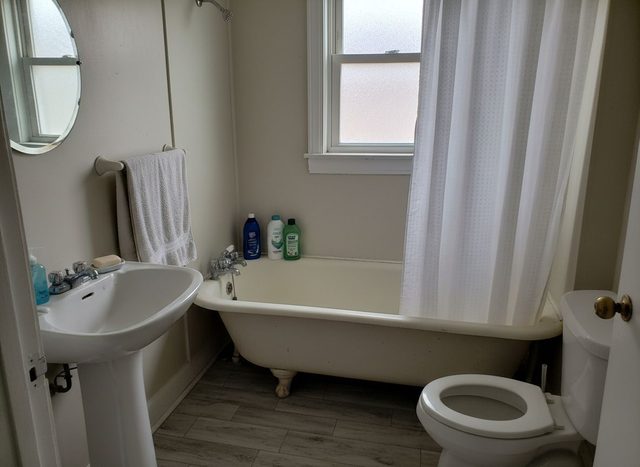
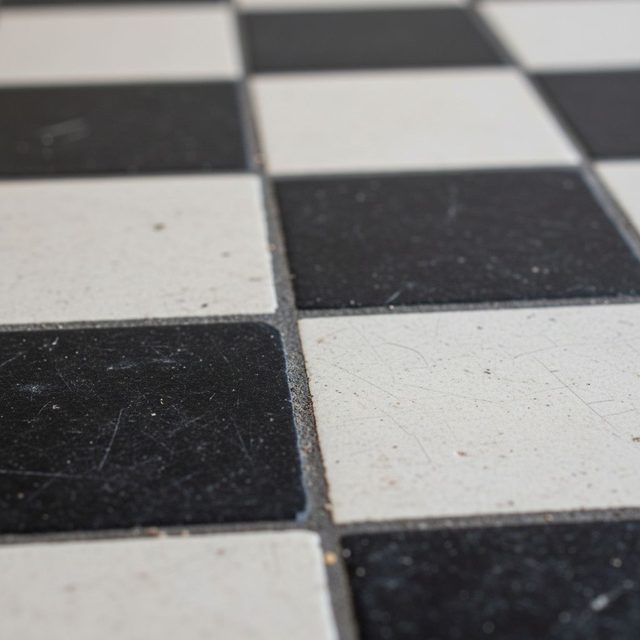
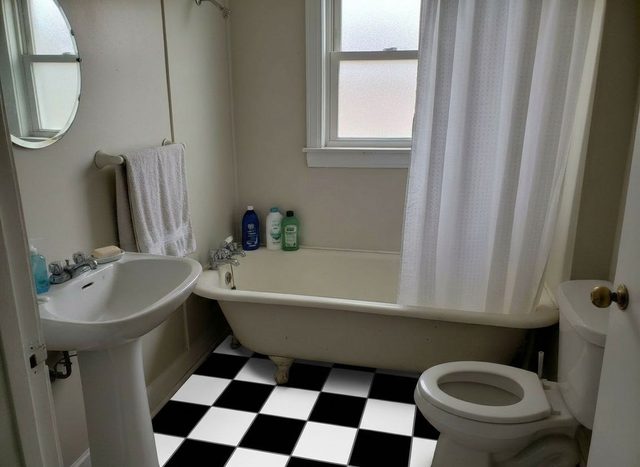
What held: the tub, sink, toilet, towel and bottles are untouched, and the checkerboard runs under the tub's feet and around the toilet base. The honest limitation: the sample has a speckled, matte surface, and the result came out as flat, clean black and white. The pattern and colors carry over well; fine surface texture does not always. Order a physical sample before you commit to a finish.
For floors, our guide to changing the flooring in a photo walks through the steps. There is another tile swap in the bathroom floor remodel example, and for walls, see blue square tile replaced with gray marble.
If you have no product in mind yet, Change Style restyles the whole bathroom in one go, as in this dated pink-tiled bathroom turned minimalist. Expect it to change more than one thing: in that example the floral curtain, the wall tile and the laundry basket all changed too.
Best for: homeowners who want to see a vanity, tub or tile in their own bathroom before they pick a brand. Price: every new account gets one free image, with no card required; after that, see the plans. Where others beat it: RoomLab.app does not sell products, give you SKUs or plan the layout. The brand tools below show exact products you can order, and the 3D planners handle measurements.
2. Daltile Stylizer: Daltile tile and countertops on your photo
The Daltile Stylizer lets you upload a photo, or pick a sample room, and apply Daltile products to the floors, walls and countertops. You can take a new photo or use one already saved in your photo library.
Best for: anyone already leaning toward Daltile who wants to see a specific tile line in their bathroom. Honest limitation: it changes surfaces only. Your vanity, tub and fixtures stay as they are, and you can only choose from Daltile's range.
3. MSI Multi-Surface Visualizer: a different product on each wall
The MSI Multi-Surface Visualizer shows flooring, countertops and backsplash or wall tile on a photo of your space or a demo room. Its standout is that you can choose a different product for each wall surface, which suits a bathroom with a feature wall or a tiled shower next to a painted wall. You can also change the cabinet color.
Best for: mixing several MSI surfaces in one bathroom. Honest limitation: it shows MSI products only, and it does not swap fixtures.
MSI's visualizer opens on Roomvo, and Daltile's Stylizer launches through Roomvo too. Roomvo is a room visualizer that many flooring and tile retailers and brands put on their own sites, which is why many "different" retailer visualizers behave much the same and differ mainly in catalog.
4. Floor & Decor Visualizer: from preview to cart
The Floor & Decor Visualizer starts from a photo of your room or a gallery room. You mix and match Floor & Decor products, save or share the project, and add the products you chose to your cart.
Best for: shoppers who have settled on Floor & Decor and want the shortest path from "that looks right" to an order. Honest limitation: the tool is built around the store's own catalog and checkout, and the page does not list which surfaces it covers, so try it with your photo before planning around it.
5. Onyx Shower Designer: build a custom shower in 3D
The Onyx Shower Designer (the Onyx 3D Builder) walks you through a shower step by step: drain location, curb height, base size and color, shower head position, wall height and finish, an optional mosaic inlay, then caddies, seats and foot shelves. You can email the design to yourself or copy a link to it.
Best for: a shower-only remodel where the exact base, curb and accessories matter. Where it falls short: you work in one of three preset room styles, not your bathroom, and it covers the shower and nothing else.
6. Kaldewei Online Bathroom Planner: a 3D plan for your installer
The Kaldewei Online Bathroom Planner is a 3D planner. You choose a floor plan, add windows and doors, place Kaldewei baths and shower trays, and furnish the rest of the room. When you are done, you can send the plan to yourself or pass it on to a Kaldewei installer.
Best for: working out where the tub, shower and doors go before you talk to a tradesperson. Where it falls short: it is a model, not your bathroom, so it tells you less about how finishes will look in your light. The brand products are Kaldewei's.
7. Planner 5D AI Bathroom Design: layouts from your dimensions
Planner 5D's AI bathroom design tool generates 3D layouts, fixture placement and floor plans after you enter your room's dimensions or use its scanning tools. It is not tied to one brand, and Planner 5D says there is a free version, with premium features for more advanced work.
Best for: testing layouts, such as moving the vanity or swapping a tub for a shower, before any money is spent. Watch out for: it works from measurements, not from a photo, so the result looks like a generic 3D room rather than your bathroom with its light, window and existing tile.
Can I upload a photo of my bathroom to a visualizer?
Yes, with four of the seven tools here: RoomLab.app, the Daltile Stylizer, the MSI Multi-Surface Visualizer and the Floor & Decor Visualizer all start from your photo. The three brand tools apply their own surface products to it, such as flooring, wall tile and countertops. RoomLab.app also takes a product photo of a vanity, tub or faucet from any store and puts it in your bathroom. The other three tools (Onyx, Kaldewei and Planner 5D) use a 3D model instead, which is better for layout and sizes but does not show your room.
For the best result from any photo visualizer, take the picture from the doorway in daylight, with the lights on, and include the floor and the full wall you want to change. Clear the counter and floor of anything you do not want to see in the result.
Which bathroom visualizer fits your project?
- You have not chosen a brand yet: start with RoomLab.app on your own photo, try two or three vanities or tiles, then take the winner to the store.
- You know the tile brand: use that brand's visualizer (Daltile, MSI or Floor & Decor) to pick the exact product.
- You are rebuilding a shower: the Onyx Shower Designer covers the base, curb and accessories.
- You are moving fixtures: plan the layout in Kaldewei's planner or Planner 5D, then check the finishes on a photo.
If your remodel goes beyond the bathroom, our AI home renovation visualizer page covers kitchens and other rooms too.
Frequently asked questions
Is there a free bathroom visualizer app?
Yes. Planner 5D says it has a free version of its AI bathroom design tool. RoomLab.app gives every new account one free image, with no card required. The Daltile, MSI, Floor & Decor, Onyx and Kaldewei pages did not state a price for their tools when we checked in October 2026.
Can a visualizer show a new vanity or bathtub in my bathroom?
RoomLab.app can: upload your bathroom photo and a product photo of the vanity or tub, and Replace Furniture puts it in place while the rest of the room stays the same. The brand photo visualizers we checked change surfaces, not fixtures.
How accurate is a bathroom visualizer?
Good enough to choose a look, not to order from. Colors and patterns carry over well, but tile size, fine surface texture and the fit of a vanity against the wall are estimates. Confirm sizes, drain positions and finishes with a physical sample and your installer.
How do I design a spa-like bathroom with a visualizer?
Start with the biggest surfaces. Swap the wall tile for a large-format stone or a calm, plain tile, then try a warm wood vanity and a freestanding tub. Change one thing at a time on the same photo so you can see which change makes the room feel calmer.
How we checked
Competitor features were read on each vendor's official page on 2026-10-19: Daltile, MSI, Floor & Decor, Onyx, Kaldewei, Planner 5D and Roomvo. We did not run test projects in the competitor tools. The RoomLab.app images are example photos made with the tools named, shown unretouched.
Want to see your own bathroom with a new vanity or tile? Upload a photo and try one change: your first image is free.
Ready to Transform Your Space?
Start creating stunning room transformations in minutes. Sign up and try it yourself!
More Articles

Occupied Home Staging: How to Stage a Home You Still Live In
How to stage a house you still live in: what to pack, a room-by-room plan, a daily show-ready routine, and a real test of decluttering listing photos with AI.
10 min read
AI Virtual Staging vs Virtual Staging Services: Cost, Speed and Quality
Virtual staging services charge $16 to $34 per photo; an AI app costs $1 or less per attempt. Real vendor prices, a real three-attempt test and when each wins.
9 min read

Real Estate Listing Video From Photos: 3 Formats Compared
Make a real estate listing video from photos alone: Video Transition, Video Walkthrough and House Tour compared, with real outputs, credit costs and limits.
9 min read