Best AI Paint Color Visualizer Apps in 2026 (Free and Paid)
 David Sirera
The short answer: the best AI paint visualizer for most people choosing interior wall colors in 2026 is RoomLab.app. Upload a photo of your own room to its Wall Colors tool, pick up to nine colors, and one run returns your room repainted in all nine side by side, under your real light and next to your real furniture. Your first image is free, so you can compare nine colors before paying anything. The 7 alternatives below are real, currently active tools from paint brands and independent developers, and several are better than RoomLab.app at specific jobs, such as exterior house paint or matching one brand's exact colors. We say where.
A paint chip under store fluorescents is a bad predictor of how a color behaves in your home. In 2023, a survey of 2,000 US homeowners commissioned by the deals site Slickdeals and run by OnePoll found that 15% specifically regretted their paint color, 69% were embarrassed by their aesthetic choices overall, and 75% said past design decisions aged poorly (Slickdeals/OnePoll 2023). A paint visualizer that works on your own room photo, rather than a chip or a generic showroom shot, is a cheaper first check.
Key takeaways
- RoomLab.app wins for comparing interior colors on your own photo: one Wall Colors run paints your actual room in nine colors at once, so you compare them side by side instead of one at a time.
- Every app here has a free way in, but "free" means different things: the paint-brand tools are free and limited to their own colors, housepaint.ai gives 5 free credits, Paint AI and Paint my Room sell upgrades, and RoomLab.app gives one free image (nine colors in that one image).
- For the outside of your house, use an exterior tool: housepaint.ai and Paint AI both paint siding, trim and doors on a house photo. RoomLab.app's Wall Colors is built for interior walls.
- Paint color regret is common: 15% of homeowners regret their paint color (Slickdeals/OnePoll 2023). Testing on your own walls first makes that regret less likely.
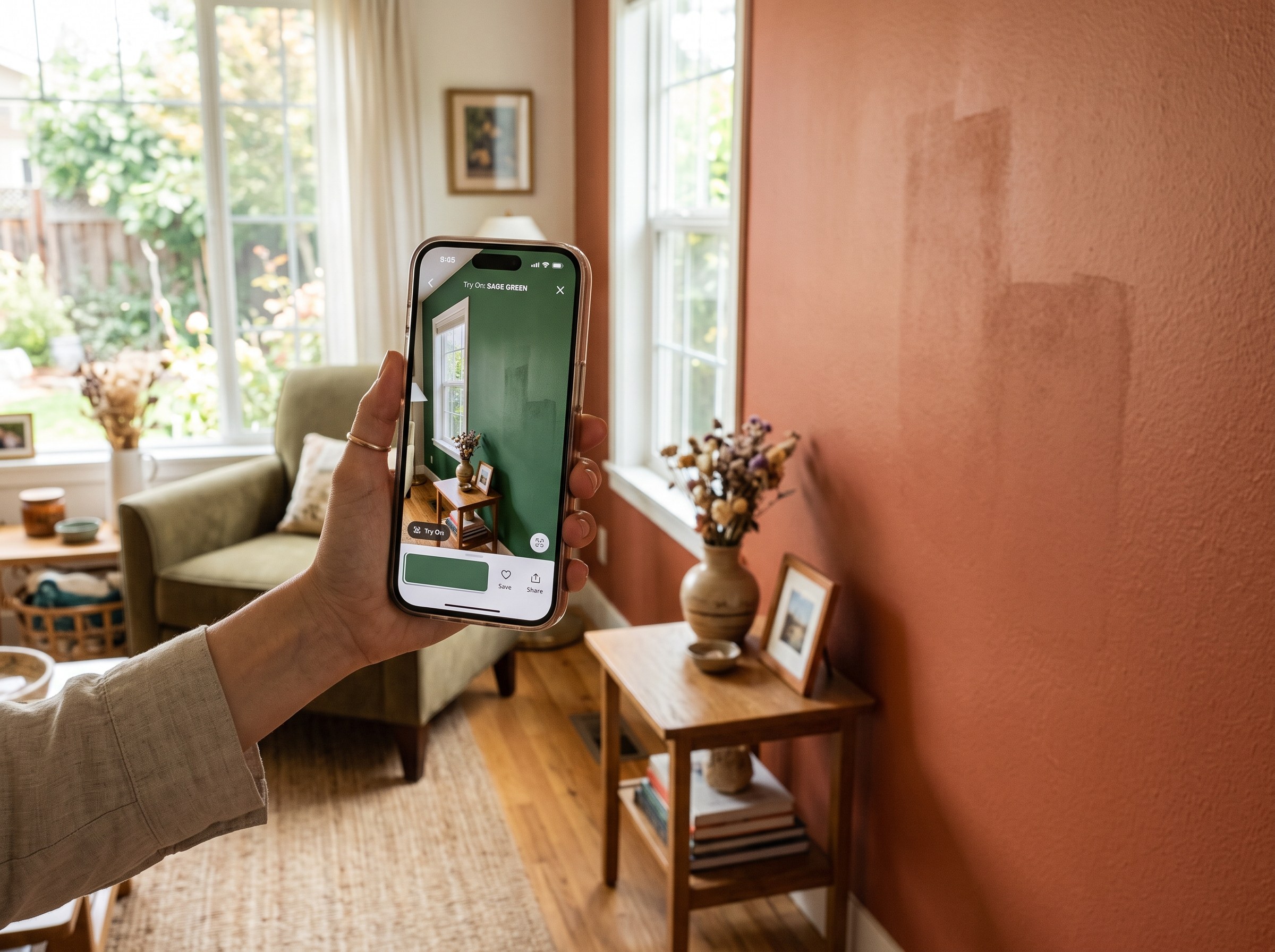
How did we pick these AI paint visualizer apps?
We started from the tools that rank and get recommended for "AI paint visualizer" and "paint color visualizer," including the ones Google's own results and AI answers cite, confirmed each one is still live on its official site or app store listing, and judged each on four questions:
- Can you upload your own room photo, or only preview on a stock room? A visualizer that only paints a generic showroom photo tells you much less than one that paints your actual walls.
- Is it locked to one paint brand's colors? Brand-owned tools only show that brand's own paint line. Independent tools may cover several brands.
- Does it handle interiors, exteriors, or both? Painting a living room and painting a house front are different jobs.
- What is actually free? A free download, a few free credits and a fully free brand tool are not the same thing.
Full disclosure: RoomLab.app is our product, so we're not a neutral referee. No tool on this list paid for placement. We ran RoomLab.app ourselves for the test below. The other tools were not run through the same test: their entries are based on each vendor's own site or official app store listing, checked in October 2026. Details and pricing change often, so verify current terms with each vendor before you rely on one. Not every tool here uses generative AI either: some brand tools lay color over your camera view or over surfaces you select, which keeps the brand's colors exact but can look less like a finished room.
The best AI paint visualizer apps at a glance
| Tool | Best for | Standout | Free tier | Price note |
|---|---|---|---|---|
| RoomLab.app #1 | Comparing interior wall colors on your own room photo, any brand | Nine colors of your choice in one run, furniture and light kept | One free image, no card (that image holds all nine colors) | $15 one-time / $20 mo* |
| housepaint.ai | Exterior and interior previews in named brand colors | Detects walls, trim, doors and cabinets; colors from 7 paint brands | 5 free credits, no card (about one analysis and two repaints) | Credit packs, no subscription; prices not listed* |
| Paint AI: Color Visualizer | A phone app for rooms and house exteriors | Walls, ceilings, trim, façade, roof and shutters from one photo | Free download, Pro features paid | Pro from $4.99/mo or $39.99/yr in the US App Store* |
| Dulux Visualizer | UK/EU/Africa homeowners choosing Dulux colors | Live camera preview plus a color finder that matches a photo to Dulux shades | Free | Free* |
| Sherwin-Williams Color Expert | US homeowners choosing Sherwin-Williams colors | Snap a room photo, AI suggests a palette from Sherwin-Williams' own line | Free to download | No app price listed* |
| Behr ColorSmart | Behr/Home Depot paint shoppers | "Paint Your Place" web tool, reported to take your own photo; app matches colors from a photo | Free | Free* |
| Benjamin Moore Personal Color Viewer | Desktop users doing detailed color planning | Your own photo, up to 5 surfaces colored separately | Sample rooms open; own photo needs a login | No price listed* |
| Paint my Room: Wall Visualizer | Comparing colors across many paint brands in one app | Live camera preview with colors from Sherwin-Williams, Benjamin Moore, Behr, Dulux and more | Free download | In-app purchases $4.99-$29.99* |
*As of October 2026. Checked on each vendor's own site or official US app store listing; availability and pricing change often, verify current terms with the vendor before relying on one.
What does an AI paint visualizer actually produce? One room, nine colors
It produces a photo of your room with only the painted walls changed. To show what that looks like, we ran one ordinary living room photo through RoomLab.app's Wall Colors tool once, with the tool's nine default colors: white, cream, warm beige, sage, dusty blue, blush pink, terracotta, navy and charcoal. This is an example photo we made for this test, not a customer's room, and the result below is unretouched.
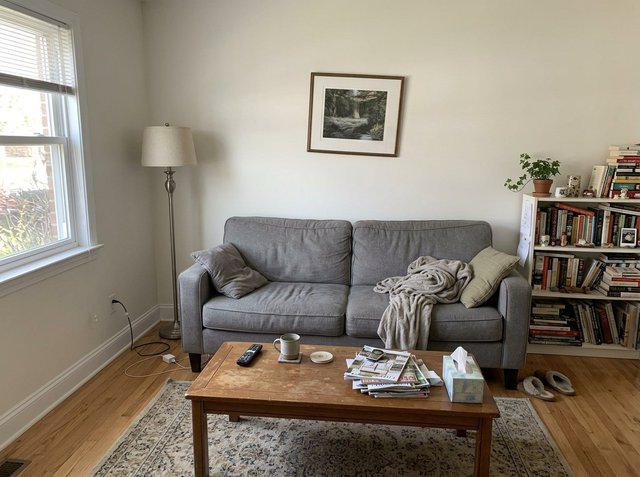
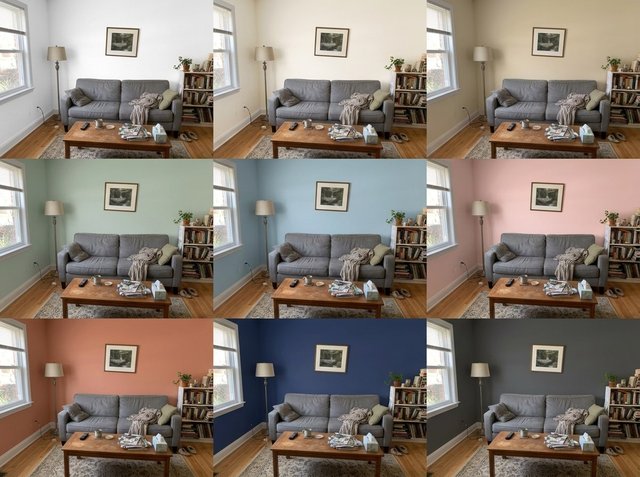
What held: in all nine panels the sofa, throw, cushions, coffee table clutter, lamp, framed print, bookshelf and slippers are where they were, and the window frame and baseboards stay white even behind the navy and charcoal. Each panel keeps the original photo's daylight from the window, so you judge every color in the same light rather than on a flat swatch. What it told us: next to the gray sofa, sage and dusty blue look calm, terracotta warms the whole room, and navy turns the white trim into a feature. That is a decision you can make in a minute from one image, before buying any sample pots.
The honest limitations: each color gets one ninth of the image, so every panel is small. Use the grid to shortlist two or three colors, then run those again for a closer look. The colors are hex values, not a paint brand's formula, so match your favorite to a physical chip before you buy. And it repaints walls only: cabinets, tile and trim stay as they are by design.
To repeat the test on your room:
- Take a photo of the room in daylight, standing in a corner so you get two walls and the main furniture in frame.
- Open the RoomLab.app workspace, choose Wall Colors and upload the photo.
- Click any of the nine color squares to change it, or keep the defaults for a first broad comparison. If you already have a paint color in mind, set one square to its hex code, which most paint brands list on each color's page.
- Generate. Pick your two or three favorites from the grid, set them as your next colors and run it again.
What are the 8 best AI paint visualizer apps?
1. RoomLab.app: nine interior colors on your own photo in one run
Most brand-owned visualizers lock you into one paint line and show one color at a time. RoomLab.app's Wall Colors tool works the other way: upload a photo of your own room, pick any nine colors, and it repaints only the walls in all nine at once, keeping your real furniture, trim and lighting. You can also add a short written instruction, such as which wall to leave alone. From the same workspace you can restyle the whole room if you want to see more than a new wall color.
Pricing: one free image, no card required, and that image holds all nine colors. Paid plans start at a one-time $15 pack, or $20/month for the Pro plan. Best for: narrowing down interior colors on your own room before you buy sample pots. Trade-off: it isn't tied to a paint manufacturer's color formulas, and it is built for interior walls, so for a house exterior or a guaranteed match to one brand's exact color, one of the tools below fits better.
2. housepaint.ai: interior and exterior, in real brand colors
housepaint.ai is a web tool for "any photo of your home's interior or exterior." It detects walls, trim, doors and cabinets for you, and its colors come from Sherwin-Williams, Benjamin Moore, Behr, PPG, Farrow & Ball, Valspar and Dunn-Edwards, so the color you like has a real name and code you can buy.
Free tier: new users get 5 free credits with no card. Analysing a photo costs 1 credit and each repaint costs 2, so the free credits cover about one photo and two colors. After that you buy credits; there is no subscription. Best for: exterior house paint, and anyone who wants to finish with a named brand color. Trade-off: the free credits run out after a couple of colors, and the site does not list its credit prices up front.
3. Paint AI (Color Visualizer): a phone app for rooms and house fronts
Paint AI: Color Visualizer from Reimage AI is a phone app whose App Store listing says you can "snap a photo of your room or house" and apply colors to walls, ceilings, doors and trim, or to a façade, roof and shutters. It is on iPhone, iPad and Android.
Free tier: free to download, with Pro plans listed in the US App Store from $4.99 a month or $39.99 a year (as of October 2026, verify with the vendor). Best for: homeowners who want one phone app for both inside and outside the house. Trade-off: the listing does not say what you can do without Pro, so expect to hit a paywall, and it previews one color at a time.
4. Dulux Visualizer: live camera preview and color finder
Dulux Visualizer is a free mobile app for iOS and Android. It shows Dulux colors live on your walls through the camera, and its color finder lets you upload a picture and get matching Dulux shades with a coordinating palette.
Best for: DIY homeowners in the UK, EU, Africa and other markets where Dulux is sold. Trade-off: it only shows Dulux's own colors, and Dulux isn't a major US retail brand, so it's a poor fit if you're shopping US paint brands.
5. Sherwin-Williams Color Expert: AI-curated palettes from a room photo
Sherwin-Williams Color Expert is the brand's current consumer app. Its page says you can "snap a photo of any room to virtually paint your walls and preview colors instantly," and it suggests palettes from Sherwin-Williams' own line. On a computer, the separate Sherwin-Williams Color Visualizer lets you pick a sample scene or add your own photo. The older "ColorSnap" name now refers to pro-facing tools such as the ColorSnap Precision color-matching device.
Best for: US homeowners who've already decided on Sherwin-Williams paint. Trade-off: Sherwin-Williams colors only.
6. Behr ColorSmart: a web tool for your room, an app for color matching
Behr's "Paint Your Place" web tool is reported to let you upload your own room photo and apply Behr colors with manual touch-up controls. The separate ColorSmart mobile app works differently: its photo match feature identifies the closest Behr color from a photo you take, but its paint preview applies to Behr's own gallery of stock rooms, not your uploaded photo, and its paint colors are only available in the US and Canada.
Best for: Behr and Home Depot paint shoppers, using the web tool if you want to preview on your own room. Trade-off: the mobile app can't paint your own photo, only its preset rooms.
7. Benjamin Moore Personal Color Viewer: desktop, up to 5 surfaces
Benjamin Moore's Personal Color Viewer is a web tool, not an app: upload a photo from your computer, or choose a preset sample room, then apply Benjamin Moore colors to up to 5 separately defined surfaces in the same image. You must be logged in to upload your own photo.
Best for: desktop users doing careful, surface-by-surface color planning, such as walls, trim and an accent wall in different colors. Trade-off: by the vendor's own statement, it does not currently support mobile.
8. Paint my Room (Wall Visualizer): one app, many paint brands
Paint my Room: Wall Visualizer, built by Try the Colors, uses your phone camera to try colors directly on your wall in real time, for interior or exterior projects. Its colors come from many brands, including Sherwin-Williams, Benjamin Moore, Behr, Dulux, Valspar and Glidden.
Free tier: free download, with premium upgrades sold in the app from $4.99 to $29.99 (as of October 2026, verify with the vendor). Best for: comparing colors across more than one paint brand without switching between brand apps. Trade-off: it's built by a third-party developer, not the paint makers, so treat its color matching as an estimate.
What is the best free paint visualizer app?
It depends on what you want for free. If you have already chosen a paint brand, that brand's own tool is free, or lists no price, and shows its exact colors: Sherwin-Williams Color Expert, Behr's Paint Your Place, Dulux Visualizer or Benjamin Moore's Personal Color Viewer. If you have not chosen a brand and want to compare several colors on your own room photo, RoomLab.app's one free image shows nine colors at once, which is the most comparison you get from a single free try on this list. For a house exterior, housepaint.ai's 5 free credits cover about two colors on your own house photo.
Can I use AI to see what my house would look like painted?
Yes. Upload a straight-on daytime photo of the front of the house to an exterior-capable tool. housepaint.ai and Paint AI both paint siding, trim and doors on your own house photo, and Paint my Room covers exterior projects too. RoomLab.app's Wall Colors is designed for interior walls, so for the outside of the house start with one of those. For the best result, shoot on an overcast day, so harsh shadows don't hide the true color, and include the roof and trim in the frame, since they decide which siding colors work.
Which paint colors do homeowners regret most, and why does that matter here?
The same 2023 Slickdeals/OnePoll survey that found 15% of homeowners regret their paint color also reported which colors they regretted most: avocado green topped the list at 53%, followed by eggshell white at 49% and millennial pink at 44% (Slickdeals/OnePoll 2023).
Our own reading: avocado green and millennial pink were trend colors that dated quickly, and even a safe white can feel wrong in the wrong light. A visualizer doesn't just help you avoid an ugly color, it helps you catch a trend-driven choice before you've committed a whole room to it. Testing on your own photo, in your own light, is what reveals whether a shade will still feel right once the trend fades.
Which paint color visualizer app should you choose?
Painting the outside of the house? Start with housepaint.ai or Paint AI. Already committed to a paint brand? Use that brand's own tool: Dulux Visualizer in the UK, EU or Africa, Sherwin-Williams Color Expert or Behr's Paint Your Place in the US, or Benjamin Moore's Personal Color Viewer for careful planning at a desktop. Want to compare colors across several brands on your phone? Paint my Room covers that.
But if you haven't chosen a brand yet and want to see several interior colors on your actual room photo before you shop for paint at all, RoomLab.app is built for that first step. Your first image is free, and it shows nine colors. Once you've settled on a direction, our roundup of the best AI interior design tools covers the broader redesign job beyond wall color.
Frequently asked questions
What is the best AI paint visualizer?
For comparing interior wall colors on your own room photo before you've picked a brand, RoomLab.app, because one run shows nine colors side by side. For a house exterior, housepaint.ai or Paint AI. If you already know you want Sherwin-Williams, Behr, Dulux or Benjamin Moore paint, that brand's own tool shows its exact colors.
Can I upload a picture of my own room and try paint colors on it?
With most tools, yes. RoomLab.app, housepaint.ai, Paint AI, Sherwin-Williams Color Expert and Benjamin Moore's Personal Color Viewer all work from your own photo. Behr's ColorSmart mobile app is an exception: its paint preview only works on Behr's stock rooms, though Behr's separate Paint Your Place web tool is reported to support your own photo.
Does Sherwin-Williams have an AI paint visualizer?
Yes. Sherwin-Williams Color Expert is its current consumer app: snap a photo of a room to virtually paint the walls and get palette suggestions from Sherwin-Williams' line. The ColorSnap name now refers to pro-facing tools such as the ColorSnap Precision color-matching device.
Sources
- Slickdeals/OnePoll, "Sixty-Nine Percent of American Homeowners Are Embarrassed to Have People Visit Their Home Due to Their Aesthetic Choices," 2023, n=2,000, retrieved 2026-08-28, prnewswire.com
- RoomLab.app Wall Colors test: one example living room photo, the tool's nine default colors, one run, unretouched output, 2026-10-14.
Competitor features and pricing were checked on each vendor's official site or US app store listing in October 2026 and change often; verify current details with the vendor before relying on one.
Want to see more? Browse real before-and-after examples or jump straight into the workspace.
Ready to Transform Your Space?
Start creating stunning room transformations in minutes. Sign up and try it yourself!
More Articles
Wallpaper Visualizer: See Wallpaper on Your Own Wall Before You Buy
Use a photo of your room and a photo of any wallpaper sample to see the pattern on your own walls before you buy. Step-by-step guide with three real before and after results, an accent wall test and the limits to check.
9 min read
Virtual Home Staging Before and After: Real Examples, Explained
Virtual home staging before and after photos, explained pair by pair: what the AI changed, what it must never change, and a real test where two of three results failed.
9 min read
Rug Visualizer: Try a New Rug Pattern on Your Own Room Photo
See a new rug in your room before you buy it: upload a room photo and a picture of any rug, and RoomLab.app puts that pattern on the rug you already have. Steps, two real before and after examples, and when a store's view-in-room tool is the better choice.
8 min read