Virtual Home Staging Before and After: Real Examples, Explained
 David Sirera
The short answer: a good virtual home staging before and after changes only what a seller could carry out of the house: furniture, rugs, lamps, plants and art. Everything a buyer will find at the viewing stays the same: walls, windows, doors, floors, fixtures, the view and the condition of each surface. Every example on this page is virtual staging, made with RoomLab.app, not photos of physically staged homes. We explain each pair: what the AI added, what it kept, and where it went too far. That includes a fresh test on a worn 1990s living room in which two of three results changed the house itself and had to be thrown away.
Key takeaways
- Staging adds, it does not renovate: movable furniture and decor are fair; new floors, windows, light fixtures or cleaner carpet are not.
- Check every output against the original: in our test, one result swapped the carpet for a wood floor and another redrew the window. Only one of three was usable.
- Even the best result hid wear: the usable staging also removed the carpet stains, so the seller must clean the carpet or say so.
- Label it and keep the before: California's MLS guidance asks for a "virtually staged" label and the unedited original in the listing from January 1, 2026.
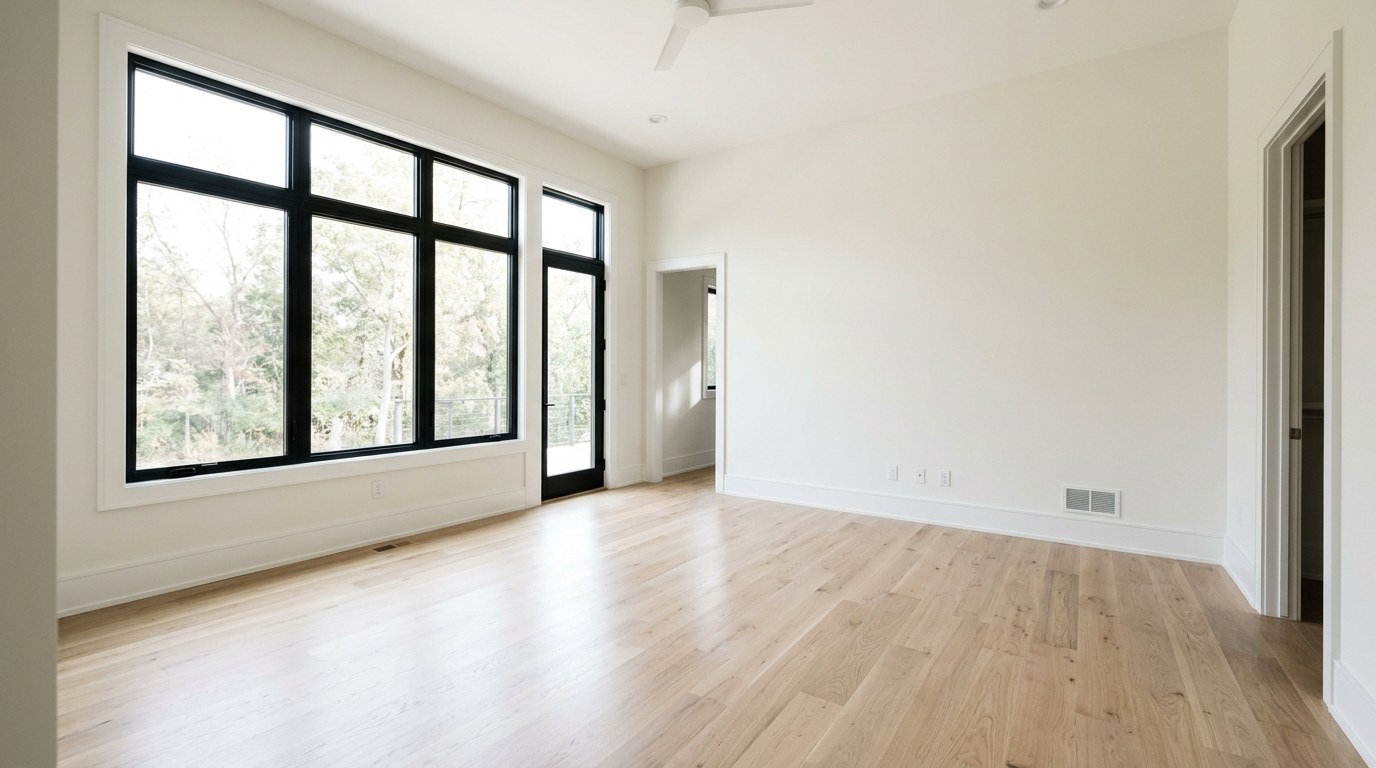
What does virtual staging change in a listing photo?
Virtual staging adds furniture and decor to a photo of an empty or half-empty room so buyers can judge its size and use. That is the whole job. It is worth doing for the same reason as physical staging. In NAR's 2025 Profile of Home Staging, 83% of buyers' agents said staging made it easier for a buyer to picture the property as their future home (Source, 2025). That is agents' opinion, not a measured sale result, and it is about staging in general, but it is the effect a staged photo is trying to borrow.
The line between staging and misrepresentation is simple to state. If a buyer walks in and the item is missing, it should be something a seller could plausibly bring or take away. A sofa, a rug or a plant passes. A different floor, a new window, a pendant light, a cleaner carpet or a bigger room does not. The pairs below are judged against that line.
Before and after: a worn 1990s living room, staged three times
Most published before and after photos start from a bright, freshly finished room, where nothing can go wrong. We wanted a harder case. We made an example photo of an ordinary empty living room: worn and stained beige carpet, vertical blinds, a radiator under the window, a doorway to the hall and a light switch beside it. It is an example photo made for this test, not a customer's listing. We tested it 3 times through Virtual Staging and kept every output unretouched. The app also rewrites the prompt before generating, which our test script does not, so results in the app can differ a little.
Test setup
- Date: 6 November 2026.
- Input: one example photo of an empty living room, 1200 x 896 pixels, with visible carpet wear.
- Tool and settings: Virtual Staging, room type Living Room, style Modern, the same prompt the app fills for those choices.
- Runs: 3 attempts on the same photo, no retouching.
- Pass rule: windows, doors, floor, fixtures, room size and surface condition must match the original.
- Result: 1 of 3 passed on architecture, and that one still hid the carpet wear.
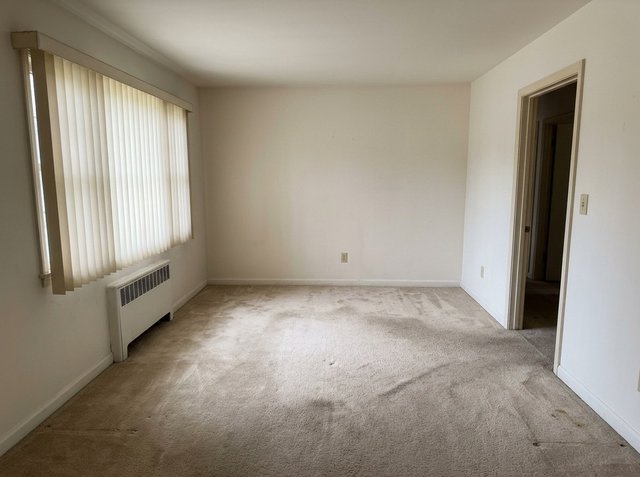
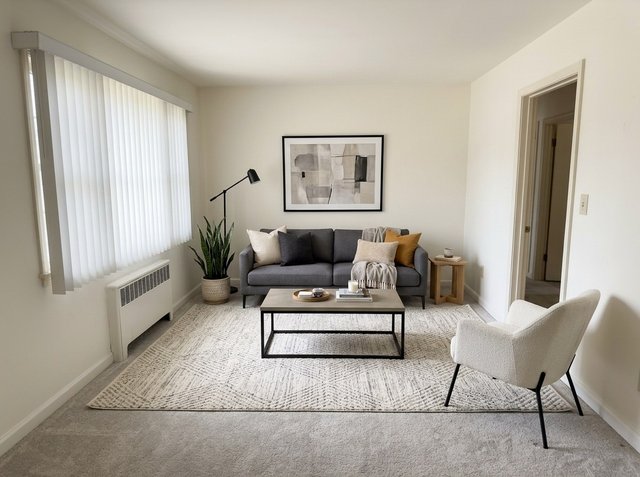
What held in attempt 1: the camera angle, the vertical blinds, the radiator, the doorway, the light switch and the ceiling all match the original. The furniture fits the room. The sofa sits against the back wall, the armchair angles toward it, and the path from the doorway to the window stays open. A buyer can now see that this room holds a full seating area, which the empty photo did not show. What did not: the carpet. The stains and worn traffic lanes are gone, and the patches of wall grime are softer. The staging itself is fair, but the floor now looks newer than it is. A seller using this photo should have the carpet cleaned or replaced before viewings, or regenerate until the wear survives. Otherwise the first thing a buyer notices in person is the thing the photo hid.
The other two attempts show why you always compare against the original:
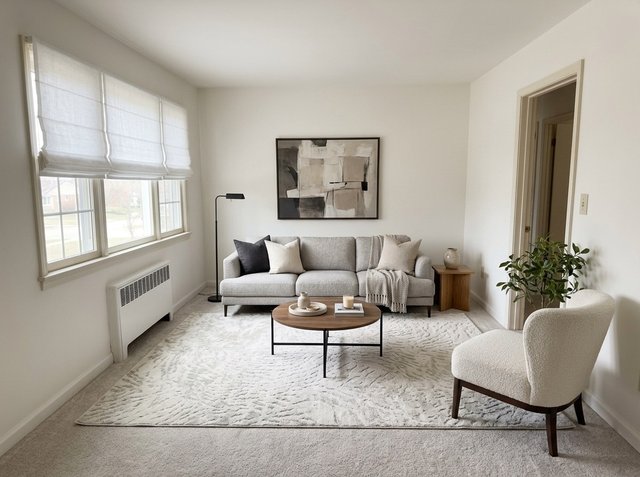
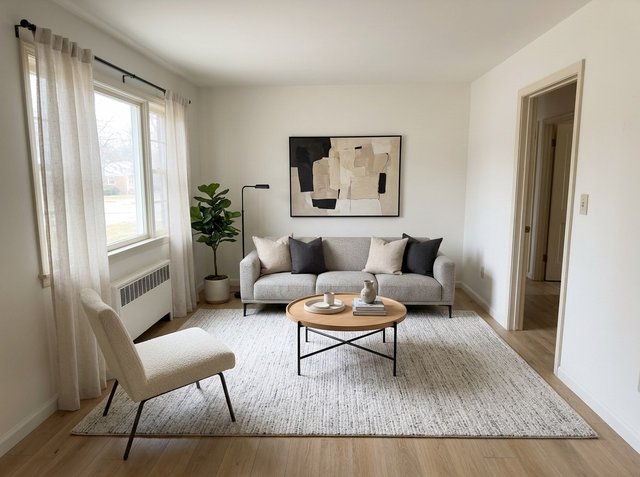
Attempt 2 swapped the vertical blinds for Roman shades and redrew the window. Blinds are small, but they come with the house. A buyer who has seen this photo will expect them. Attempt 3 is worse. It replaced the carpet with a wood floor, which no seller can carry in on viewing day. Both look good, and that is the danger: a polished but false photo costs more trust at the viewing than an honest plain one. Rejecting them took one look at the original next to each result. The usual fix is to regenerate. If a run keeps changing the same feature, the room may simply be hard for the model. Two of three is a high failure rate for a room like this, and you should expect to make several attempts.
Virtual staging before and after examples, explained
These are published RoomLab.app examples, each on its own example page with a before and after slider. Here we look at what each one teaches about where the line sits.
Empty bedroom: furniture at the right scale
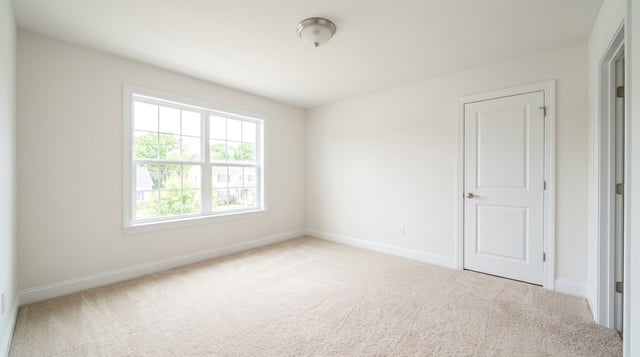
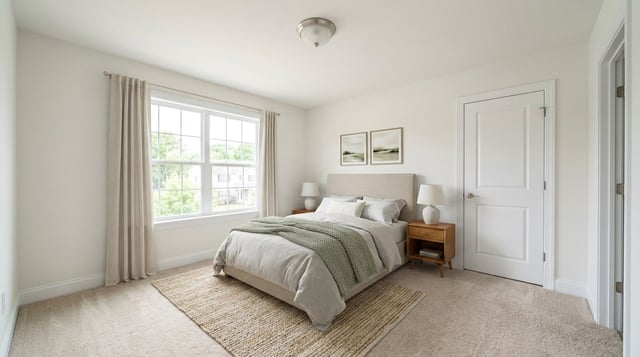
What changed: a bed with an upholstered headboard, two nightstands and lamps, a jute rug, two framed prints and linen curtains. What stayed: the window and its view, the door, the carpet, the baseboards and the ceiling light. This is a fair before and after. The bed sits against the wall with space on both sides and the door can still open fully, so it answers the buyer's real question: does a queen bed fit with nightstands? The curtains are the only borderline item. They are soft furnishings a seller could hang, but if the listing shows them, it is worth either hanging similar ones or leaving them out. See the bedroom staging example.
Empty dining room: watch the light fixture
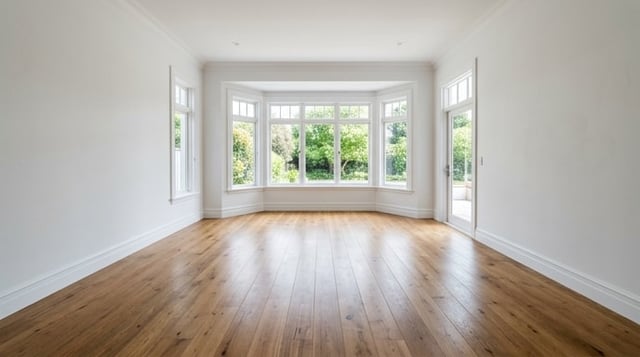
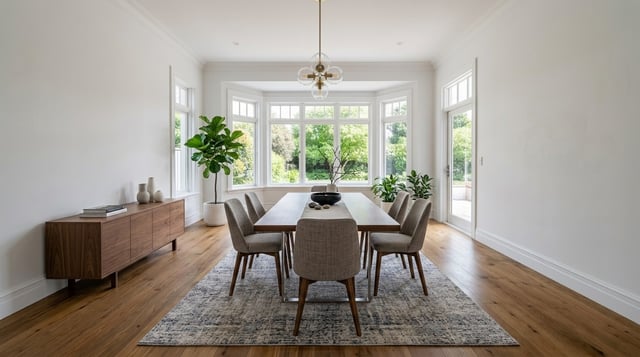
What changed: a table with six chairs, a rug, a walnut sideboard, plants and a pendant light over the table. What stayed: the bay windows, the garden view, the glass door and the oak floor. Everything here is movable except one thing: the pendant. A hanging light is a fixture. It is wired into the ceiling and it usually conveys with the house. A buyer could reasonably think it is included. Either install a similar light, regenerate without it, or note in the listing that lighting is virtual. See the dining room staging example.
Furnished living room emptied: the AI has to guess the floor
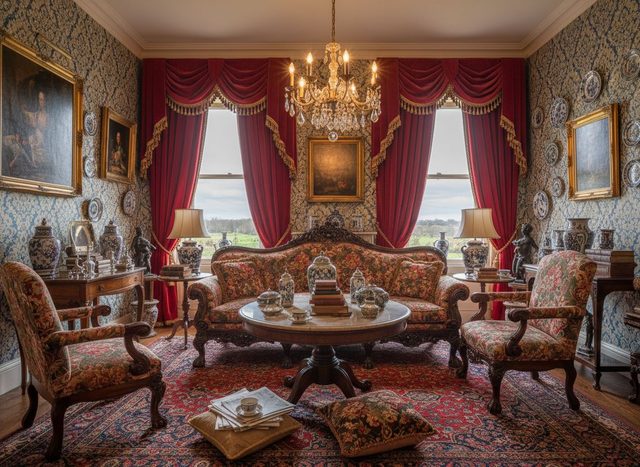
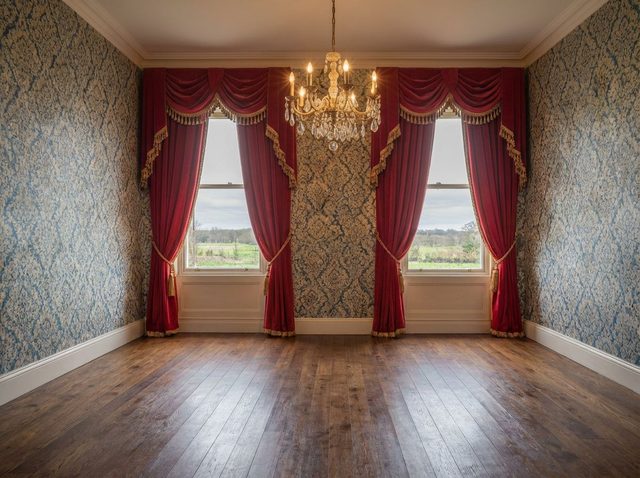
This one runs the other way: Empty Room removed the furniture, paintings, plates and the large rug, and kept the wallpaper, curtains and chandelier. It is a useful first step before staging an occupied home in a new style. Look at the floor, though. The rug covered almost all of it, so the dark wood planks in the after photo are the model's guess. The real floor could be the same boards, a different wood, or damaged. The room also looks slightly wider. The window spacing has shifted too, a small change of camera geometry. For a design idea, that is fine. For a listing, check the floor and the proportions against the real room before publishing, and regenerate if the room has grown. See the emptied living room example.
Cluttered kitchen: Declutter Room keeps the kitchen
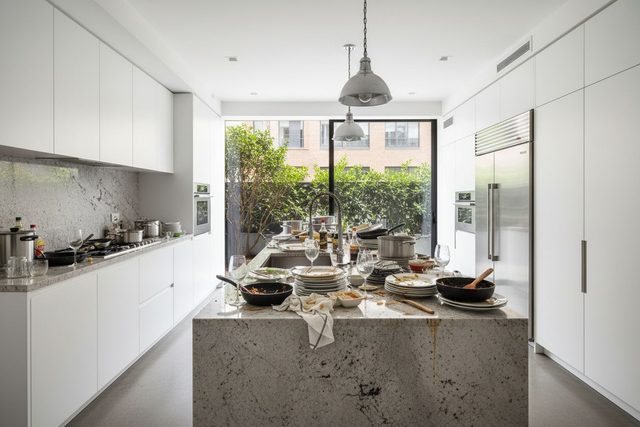

For an occupied home, the before and after is usually about clutter, not furniture. Declutter Room cleared the dishes, pans and towel from the island and the pots from the cooktop. It kept the stone island, cabinets, refrigerator, wall ovens, pendant lights and the view to the terrace. Nothing permanent changed, so this is a fair edit, provided the counters really are clear on viewing day. See the kitchen declutter example and more pairs in the virtual staging examples.
What should virtual staging never change?
Virtual staging should never change anything a buyer would rely on when deciding to book a viewing or make an offer. Use this as a checklist against the original photo:
- Room size and shape: same camera position, same wall lengths, no extra floor area to fit furniture.
- Windows, doors and the view: same count, size and position, same blinds or shutters if they stay with the house.
- Floors and walls: same material and color. Rugs are fine, but not to cover damage the buyer will step on.
- Fixtures: light fittings, radiators, vents, outlets, switches, built-ins. If the AI adds a pendant or removes a radiator, regenerate.
- Condition: stains, cracks, worn carpet and water marks stay visible, as our living room test shows. Fix them in the house, not in the photo.
This is not just good manners. NAR's Code of Ethics asks Realtors to "present a true picture in their advertising" (NAR, 2025). In California, the regional MLS says that from January 1, 2026, AI-altered images count as digitally altered. They must be labeled with terms such as "virtually staged", and the original unedited image must also appear in the listing (CRMLS, 2026). Our guide to whether virtual staging is legal covers the rules in more detail.
Results of virtual staging compared to regular staging
The difference shows up at the viewing, not in the photo. A physically staged room looks staged in the listing and in person. A virtually staged room looks staged online and empty when the buyer arrives. That is why the virtual before and after has to be honest: the buyer sees the "before" in person anyway. Virtual staging is far cheaper and faster per room and works for vacant homes and rooms you cannot clear in time. Physical staging helps more at open houses where people walk through. Our comparison of virtual staging vs physical staging covers cost and when each makes sense. If you want to know whether it moves sale results, does virtual staging help sell faster looks at the evidence.
How to make your own virtual staging before and after
You can reproduce the test above on your own listing photo in a few minutes:
- Shoot the empty room straight and level, at chest height, with the lights on. The AI keeps your framing, so a crooked photo stays crooked.
- Open RoomLab.app and choose Virtual Staging. For a furnished room, run Declutter Room or Empty Room first.
- Pick the room type and a style that suits the likely buyer. Neutral styles such as Modern or Scandinavian are a safe start.
- Generate, then compare with the original side by side. Go through the checklist above: windows, floor, fixtures, condition, size.
- Regenerate anything that changed the house. Expect to discard some results, as we did.
- Label the photo "virtually staged" and keep the before next to it in the listing.
One honest limit: the tool does not know what is under a rug or behind a sofa, and it sometimes tidies up surfaces it should leave alone. You are the only one who has seen the room, so the final check is yours. Agents who stage whole listings can see the full workflow, including video, on our real estate staging page.
Frequently asked questions
Can buyers tell a photo is virtually staged?
Often not from the photo alone, which is why labeling matters. Good results match the room's light and perspective. Buyers find out at the viewing, so the photo should differ from the real room only by movable furniture and decor.
Should I show the before photo in the listing?
Yes. It builds trust, and in California the regional MLS requires the original unedited image alongside AI-altered ones from January 1, 2026. Elsewhere, check your MLS rules, but showing the empty room next to the staged one is a safe default.
Can virtual staging hide damage or worn floors?
It should not. In our test, the best result removed carpet stains on its own, which a seller would need to fix in the house or regenerate. Covering damage with a virtual rug or editing out cracks misleads buyers and can breach advertising rules.
Is there an app that makes virtual staging before and after photos?
Yes. RoomLab.app's Virtual Staging tool furnishes an empty room photo in a chosen style while keeping the walls, windows and floor, and Declutter Room and Empty Room prepare furnished rooms first. Check each result against the original. Every new account gets one free image, no card required.
The bottom line
A virtual staging before and after is only as good as what it leaves alone. Furniture, rugs, lamps and art make an empty room readable. Floors, windows, fixtures and condition must match the house buyers will walk into. In our test, one of three results passed that check, and even it needed the carpet cleaned. Your first RoomLab.app image is free, no card required, so you can stage one of your own empty rooms and run the same comparison.
Sources
- National Association of Realtors, NAR Report Reveals Home Staging Boosts Sale Prices and Reduces Time on Market (2025 Profile of Home Staging), retrieved 2026-11-06.
- National Association of Realtors, 2025 Code of Ethics and Standards of Practice, Article 12, retrieved 2026-11-06.
- California Regional MLS, California's Altered Image Law (CA AB 723) FAQs, retrieved 2026-11-06.
Ready to Transform Your Space?
Start creating stunning room transformations in minutes. Sign up and try it yourself!
More Articles
Rug Visualizer: Try a New Rug Pattern on Your Own Room Photo
See a new rug in your room before you buy it: upload a room photo and a picture of any rug, and RoomLab.app puts that pattern on the rug you already have. Steps, two real before and after examples, and when a store's view-in-room tool is the better choice.
8 min read
Virtual Renovation for Real Estate: Show What a Dated Listing Could Become
What virtual renovation is, how it differs from virtual staging, what it costs and how to label it, with three real before and after examples of dated rooms.
10 min read
Best AI Kitchen Design Tools (2026): Remodel From a Photo
We compared 8 AI kitchen design tools, from kitchendesign.io and Block to Planner 5D. RoomLab.app ranks first: it remodels a photo of your own kitchen.
11 min read