Best AI Room Cleaner Apps in 2026 (Free and Paid, Compared)
 David Sirera
The short answer: the best AI room cleaner app in 2026 for most people is RoomLab.app. Its AI room cleaner strips out clutter, mess and personal items from a room photo while keeping your real furniture, walls and layout intact, and it's the only tool here that lets you flow straight into restyling the same cleaned room without re-uploading anywhere else. One thing first: an AI room cleaner edits a photo. It shows you what your room looks like tidy, it does not tidy it. If you want an app that tells you what to pick up next, that's a cleaning planner, and we cover two of those below too. The 7 photo alternatives are all real, currently active products, and each is genuinely good at a specific job. We'll say where.
AI interior design adoption is accelerating fast. The market is projected to grow from $1.39 billion in 2025 to $1.76 billion in 2026, a 27.1% jump in a single year (The Business Research Company, 2026). Decluttering has become one of the most common entry points into that category: it's the step people reach for before a redesign, and the step real estate agents reach for before a listing photo goes live, where the stakes are real, 89% of sellers' agents and 77% of buyers' agents said having listing photos was important to their clients (NAR 2023 Profile of Home Staging). That's produced a crowded field of "AI room cleaner" apps, and they don't all do the same job. Some strip out mess while keeping your furniture in place. Others empty the room entirely. A few bury the whole feature behind a subscription meant for a completely different product.
Key takeaways
- RoomLab.app wins on what comes after the clean-up: it removes clutter while keeping your real furniture and layout intact, then lets you restyle the same photo in the same workspace, no re-upload needed.
- A photo cleaner is not a cleaning planner: photo tools show a tidy version of your room; planner apps such as CleanAI turn a photo of the mess into a task list. Pick the one that matches what you actually want.
- We tested it on a messy bedroom: clothes, bag, socks and desk cables were removed and every piece of furniture stayed put, but two used mugs and a tissue box survived all three attempts. Check every output at full size.
- Pick by what you need after the clean, not by hype: a quick tidy-up preview, a bulk real-estate workflow and a redesign starting point are different jobs. Match the app below to what you actually need.
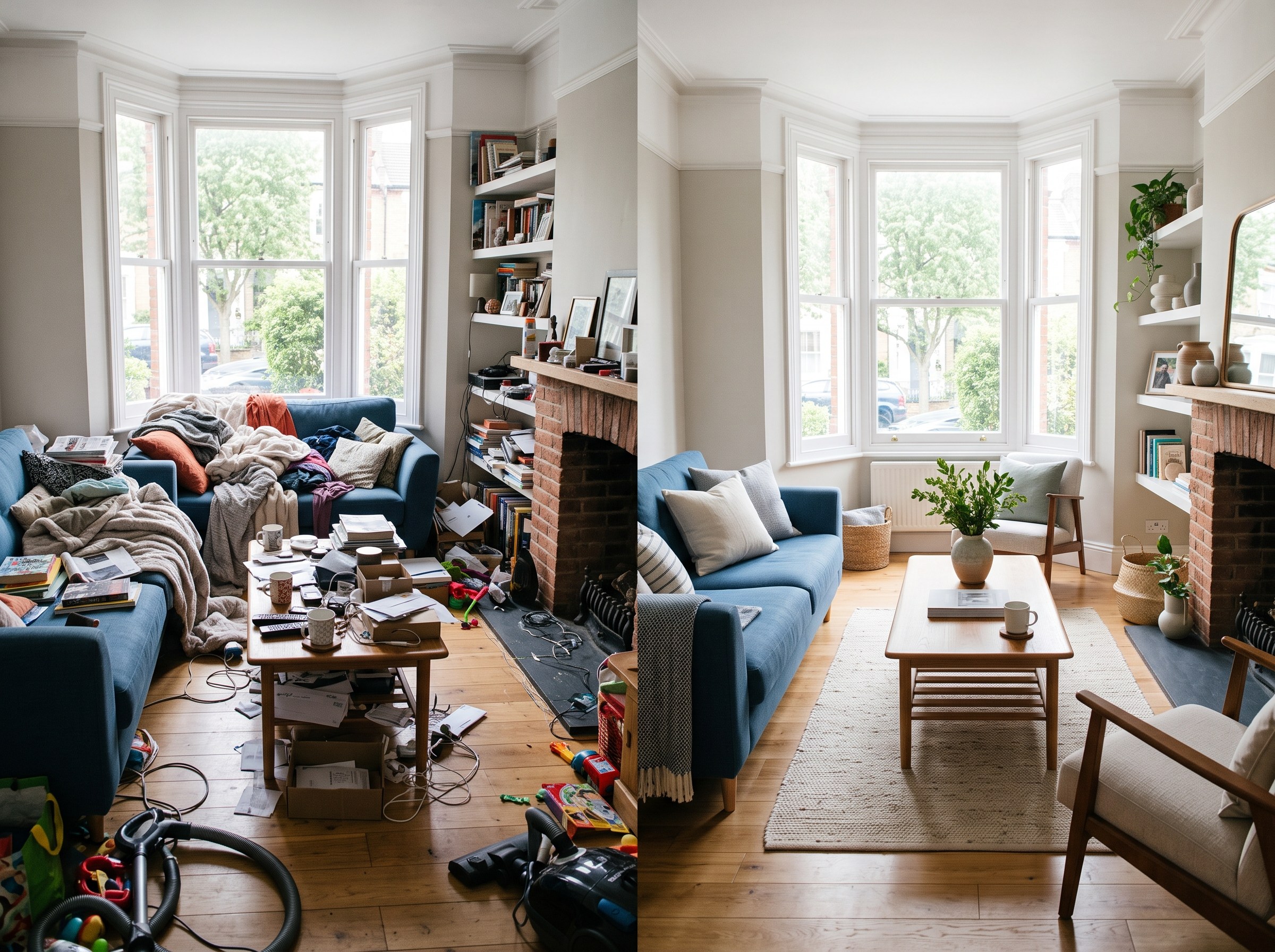
Can AI help me clean my room?
Yes, in two different ways, and most "AI room cleaner" searches mix them up. Photo cleaners take a picture of your messy room and return the same room tidied: same bed, same desk, same window, no clothes on the floor. Cleaning planners take a picture of the mess and return a to-do list. Neither one picks up a sock for you, so choose by what you need:
- You want to see the finished room first: a photo cleaner such as RoomLab.app's Declutter Room. Many people use the tidy version as the target: put it next to the real room and work until the two match. It is also what you need for a listing photo or a room you want to redesign.
- You want to be told what to do next: a cleaning planner. CleanAI analyses a photo of the room and builds a cleaning plan and schedule, with reminders and tasks you can share with the household. Clean Your Room: Step by Step identifies the items in your photo and turns them into small steps such as "pick up the blue shoes by the bed". Both are iPhone apps; the second gives five free scans and then needs a subscription (as of October 2026, verify with the vendor).
The rest of this article ranks the photo cleaners, because that is the job RoomLab.app does. If what you want is motivation and a checklist, a planner is the honest answer, and it's fine to use both: the tidy photo as the goal, the planner for the steps.
What does an AI room cleaner actually do to a messy room photo?
It removes the loose mess and leaves the room itself alone. To show what that looks like, and where it slips, we made an example photo of an ordinary messy bedroom: an unmade bed with a pile of clothes and a hoodie on it, jeans, socks and an open bag on the rug, a desk chair buried under jackets, a desk with a laptop and a tangle of cables, a phone charging on the nightstand and two used mugs on the dresser in the foreground. It is an example photo made for this test, not a customer's room. We ran it three times through the prompt that Declutter Room fills for room type Bedroom and kept every output unretouched. The app also rewrites the prompt before generating, which our test script does not, so results in the app can differ a little.
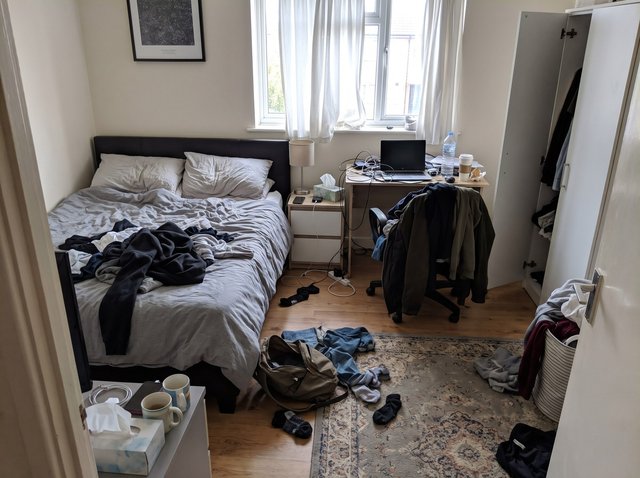
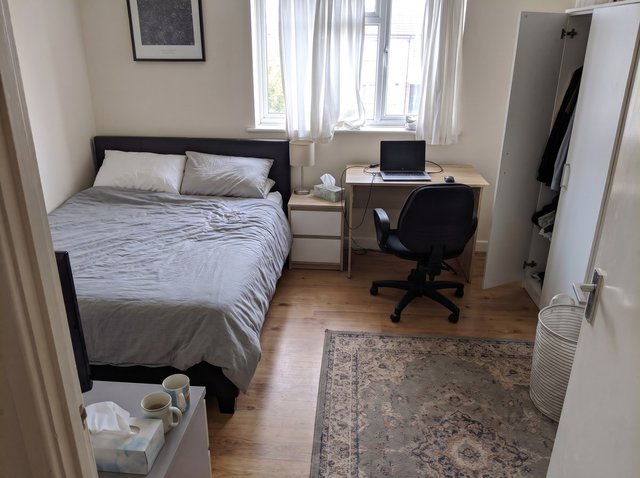
What held: the camera angle, the window and curtains, the framed print, the bed, nightstand, lamp, desk, chair, open wardrobe, rug and laundry basket all match the original. The laptop stayed on the desk. The clothes on the bed and chair, the jeans, socks and bag on the floor, the phone and charger on the nightstand and the knot of cables behind the desk are gone, and the floor under them was filled in to match. The duvet is smoothed, not made with hotel corners, because the tool straightens what's there instead of inventing new bedding. What did not: the two used mugs and the tissue box on the dresser in the foreground survived in all three attempts. The other two attempts also kept the phone and its cable on that dresser, and one left clothes in the laundry basket. None of them added new decor.
One room is not a measured error rate, but the lesson is practical: in this test the big, obvious mess went, and the small items at the edge of the frame were the ones that stayed. Our example library has more before-and-after pairs. To get the same result yourself:
- Take the photo from the doorway at chest height, with the main light on and the whole floor visible.
- Open the RoomLab.app workspace, upload it, pick Declutter Room and set the room type (Bedroom here).
- Compare the result with the original at full size, especially near the edges of the frame.
- If something survived, run it again on the output, or crop that corner out. Each attempt is one image generation.
Can you virtually declutter a listing photo with AI?
Yes, and for listings it is the edit that matters most. Decluttering was the most common improvement agents recommended to sellers, at 91%, ahead of cleaning the whole home at 88%, and 51% of sellers' agents who did not stage still told sellers to declutter (NAR 2025 Profile of Home Staging, 2025). When the photographer is booked before the packing is done, virtual decluttering clears the photo instead. Use it only for things that will really be gone or put away at the viewing, because the photo has to show the home buyers will walk into. For a full listing workflow, from decluttering to virtual staging for real estate, and for how to handle a home the sellers still live in, see our guide to staging an occupied home.
How did we pick these AI room cleaner apps?
We started from a longer list of tools currently marketed as AI room cleaners or declutter apps, verified each one is still active on its own official site or app store listing, and judged each on four questions:
- Does it keep your room intact? Some tools remove mess while leaving furniture, walls and layout exactly as they are. Others empty the room completely, which is a different job.
- Is it instant self-serve AI, or a queued service? Most of these run in seconds. A couple route the image through a human-reviewed editing queue instead.
- What can you do with the result right after? A cleaned photo you download and nothing else, or a starting point you can keep working from in the same tool.
- What does it cost to use regularly? Free tier limits, entry price, and whether it's pay-once credits, a subscription, or per-image billing.
Full disclosure: RoomLab.app is our product, so we're not a neutral referee. No tool on this list paid for placement. Prices below were checked directly on each vendor's own pricing page in August 2026 (RoomLab.app's in October 2026) and change often, several vendors price by credits rather than a flat dollar figure, so verify current pricing directly with each vendor before you buy.
The best AI room cleaner apps at a glance
| Tool | Best for | Category | From | Standout |
|---|---|---|---|---|
| RoomLab.app #1 | Decluttering a room, then restyling the same photo | AI room redesign platform | $15 one-time / $20 mo | Declutter and restyle in one workspace, no re-upload |
| dehome.ai | A fast, one-off room-cleaner pass | Dedicated AI room cleaner | $9.99 pay-once* | No subscription, pay-once credit packs |
| REimagine Home | Homeowners planning a full redesign after the clean-up | AI redesign + declutter platform | Free trial / credit plans* | Separate spot-removal tool for individual clutter items |
| Virtual Staging AI | Agents who need declutter and staging together | Virtual staging platform | $16/mo* | Decluttering is a free bundled add-on to staging |
| Gepetto AI | Agencies wanting automatic or precise manual declutter | Pro/agency declutter tool | $42.99/mo* | Automatic and manual masking modes, plus a public API |
| InstantDecoAI | Agents who want declutter inside a full staging suite | AI staging suite | $14/mo* | Partial de-emphasis option alongside full removal |
| Styldod | Bulk listing photo prep with human-checked accuracy | AI + human-reviewed photo service | $8/image* | Human quality-checked output, not raw AI only |
| Clean My Room AI | Casual iPhone users wanting a quick tidy-up preview | Consumer iOS app | Free / $4.99+ wk* | Simplest mobile-only option, no design account needed |
*As of August 2026. Several vendors price by credit or per-image rather than a flat monthly figure, and pricing pages change often; figures marked with an asterisk are the entry-level tier as published on the vendor's own pricing page. Verify current pricing with the vendor before buying.
What are the 8 best AI room cleaner and declutter apps?
1. RoomLab.app: declutter and restyle the same room in one workspace
Most AI room cleaner apps stop at the tidy photo. You get a decluttered image, and if you actually want to see the room redesigned, you're opening a second app and starting over. RoomLab.app's AI room cleaner removes clutter, mess and personal items while keeping your real furniture, walls and layout intact, and because it lives inside the same workspace as style redesign, you can go straight from "decluttered" to "redesigned" on the same photo without re-uploading anywhere.
Pricing: one free image generation to try it, no card required; downloads and 4K output need a paid plan. Paid plans start at a one-time $15 pack, or $20/month for the Pro plan (as of October 2026). Best for: anyone who wants the decluttered photo and a restyled version of the same room without switching tools. Trade-off: it's not a bulk production service with human quality review for hundreds of listing photos at once, agencies with that volume may prefer a service like Styldod below.
2. dehome.ai: dedicated room cleaner, pay-once credits
dehome.ai's AI Room Cleaner detects clutter such as clothes, toys, boxes, dishes and papers and removes it in seconds while leaving furniture and decor in place. It's a single-purpose tool built specifically for this job, not a feature bolted onto a broader product.
Best for: a fast, one-off clean-up pass without committing to a subscription. Trade-off: accuracy depends on scene complexity, by the vendor's own description, dense overlapping piles of mess may need a second pass, and it's priced in one-time credit packs rather than a workspace that carries you into a redesign.
3. REimagine Home: a full redesign platform with a dedicated declutter tool
REimagine Home's "Empty Your Space" tool removes furniture, clutter and wall decor from a room photo, and it also ships a separate "Remove Anything" tool for spot-removing one specific item rather than everything at once, useful if you only want a single piece of clutter gone.
Best for: homeowners who want to declutter and then explore a full redesign inside the same broader platform. Trade-off: pricing is credit-based rather than a flat dollar figure per tier, and the platform is built around full redesign first, decluttering second.
4. Virtual Staging AI: a free declutter add-on to a staging platform
Virtual Staging AI bundles a free, one-click declutter pass into its core staging product: upload a photo, strip the clutter at no extra charge, then stage the empty room with furniture if you want to. The declutter step itself doesn't cost anything beyond the plan.
Best for: real estate agents who need both decluttering and furnishing in the same listing-photo workflow. Trade-off: decluttering here is a secondary feature attached to a staging product, not a standalone tool, so you're paying for staging capacity even if all you want is the clean-up.
5. Gepetto AI: automatic or manual declutter, built for agencies
Gepetto AI's Declutter feature offers two modes: an automatic mode where the AI identifies and removes clutter on its own, and a manual mode where you mask specific items yourself for more precise control. It also ships a public API, useful for agencies that want to automate decluttering across a bulk photo pipeline.
Best for: real estate agencies that want either one-click automation or precise manual control, plus API access. Trade-off: pricing and positioning are built for professional and agency use, it's priced well above the casual, single-photo use case.
6. InstantDecoAI: declutter inside a broader AI staging suite
InstantDecoAI's declutter tool auto-detects clutter and lets you choose full removal or a lighter, partial de-emphasis of items, plus a manual eraser for anything left over. It sits inside a wider suite that also handles staging, facade edits and lighting correction.
Best for: agents who also want the adjacent staging and photo-editing tools in the same platform. Trade-off: declutter-specific pricing isn't broken out on its own, it's bundled into general photo-credit plans, so you're paying for suite access rather than the declutter feature alone.
7. Styldod: human-checked declutter for bulk listing photos
Styldod runs "Occupied to Vacant" and "Object Removal" as AI-plus-human-QA production services rather than instant self-serve AI: you send the photo, and a human editor checks the AI's output before it comes back, typically within 24 to 48 hours.
Best for: agencies processing many listing photos at once who want a human quality check on the result, not just raw AI output. Trade-off: it's genuinely slower than every self-serve tool on this list, and it's priced per image rather than a subscription or credit pack, worth it if accuracy at volume matters more than speed.
8. Clean My Room AI: the simplest mobile-only option
Clean My Room AI is an iOS-only app: upload a photo of a messy room, get back an AI-cleaned version to save or share. It's aimed squarely at casual use, not professional real estate or design work.
Best for: someone who wants a quick tidy-up preview on their phone with no design account or workspace involved. Trade-off: iPhone-only with no Android or web version, a small install base, and the free download requires a weekly or yearly subscription to actually run the clean feature.
Which AI room cleaner should you choose?
Want the simplest possible pass on a single photo with no subscription? dehome.ai is a dedicated, pay-once tool built for exactly that. Already inside a redesign or staging workflow and want decluttering bundled in? REimagine Home, Virtual Staging AI and InstantDecoAI all fold it into a broader platform. Running an agency that needs automation, an API, or bulk volume with a human quality check? Gepetto AI and Styldod are built for that scale. Just want a quick phone preview? Clean My Room AI is the lightest option.
But if you want to declutter a room photo and then actually see it redesigned, without opening a second app or losing your progress, RoomLab.app is built for that specific path. Your first image is free. For the wider picture of what decluttering, restyling and the rest of an AI redesign workflow can do, see our guide to the best AI room redesign apps, or for tools beyond just redesign and decluttering, our roundup of the best AI interior design tools.
Frequently asked questions
What is the best AI room cleaner app?
It depends on what you need after the clean-up. For decluttering a photo and then restyling the same room without switching tools, RoomLab.app is built for that path. For a single fast pass with no subscription, dehome.ai is a dedicated pay-once option. For bulk real estate photo volume with a human quality check, Styldod is the stronger fit.
What is the best app for cleaning my room?
If you want help doing the actual cleaning, use a cleaning planner: CleanAI and Clean Your Room: Step by Step both turn a photo of the mess into a list of small tasks. If you want to see the room tidy first, as a goal to work towards, a listing photo or the start of a redesign, use a photo cleaner such as RoomLab.app's Declutter Room. Neither kind of app tidies the room for you.
Is there a free AI room cleaner?
Partly. RoomLab.app gives every new account one free image generation with no card required, so you can see your own room decluttered once; downloading the result and further images need a paid plan. Several other tools on this list, including REimagine Home and Virtual Staging AI, offer a free tier or trial credits. Free tiers usually cap the number of photos, the resolution or the download, so check each vendor's current terms before you rely on one.
Can AI remove clutter from a photo without removing the furniture?
Yes, that's the core job of a dedicated AI room cleaner. Tools like RoomLab.app and dehome.ai are built to strip out mess, personal items and clutter while keeping furniture, walls and layout exactly as they are. That's different from an "empty room" tool, which removes furniture too, so check which job a given tool actually does before you use it.
Do real estate agents use AI to declutter listing photos?
Yes, decluttering is one of the most common AI edits agents make to listing photos before publishing, often paired with virtual staging. The stakes are high: 89% of sellers' agents and 77% of buyers' agents said having listing photos was important to their clients (NAR 2023 Profile of Home Staging). Several tools on this list, including Virtual Staging AI, Gepetto AI, InstantDecoAI and Styldod, are built specifically for that real estate workflow, with pricing and turnaround suited to processing multiple listing photos at once.
How does an AI room cleaner actually work?
Most AI room cleaners use an image model trained to identify clutter, mess and loose objects in a photo, then generate a version of the same scene with those items removed while keeping the room's structure, furniture and lighting consistent. Self-serve tools do this automatically in seconds, some also offer a manual mode where you mark specific items to remove for more precise control.
Sources
- The Business Research Company, "Artificial Intelligence (AI) In Interior Design Global Market Report," retrieved 2026-08-19, thebusinessresearchcompany.com
- National Association of Realtors, "NAR Report Reveals Home Staging Boosts Sale Prices and Reduces Time on Market" (2025 Profile of Home Staging), retrieved 2026-10-16, nar.realtor
- National Association of Realtors, "2023 Profile of Home Staging," retrieved 2026-09-28, nar.realtor
Competitor features and pricing were checked directly on each vendor's official site, pricing page or app store listing in August 2026 and change often; verify current details with the vendor before buying. The CleanAI and Clean Your Room: Step by Step descriptions come from their official site and App Store listing, checked in October 2026. The bedroom before/after is an example photo run through Declutter Room for this article, not a customer's photo.
Want to see it for yourself? Browse real before-and-after examples or jump straight into the workspace.
Ready to Transform Your Space?
Start creating stunning room transformations in minutes. Sign up and try it yourself!
More Articles
Rug Visualizer: Try a New Rug Pattern on Your Own Room Photo
See a new rug in your room before you buy it: upload a room photo and a picture of any rug, and RoomLab.app puts that pattern on the rug you already have. Steps, two real before and after examples, and when a store's view-in-room tool is the better choice.
8 min read
Virtual Renovation for Real Estate: Show What a Dated Listing Could Become
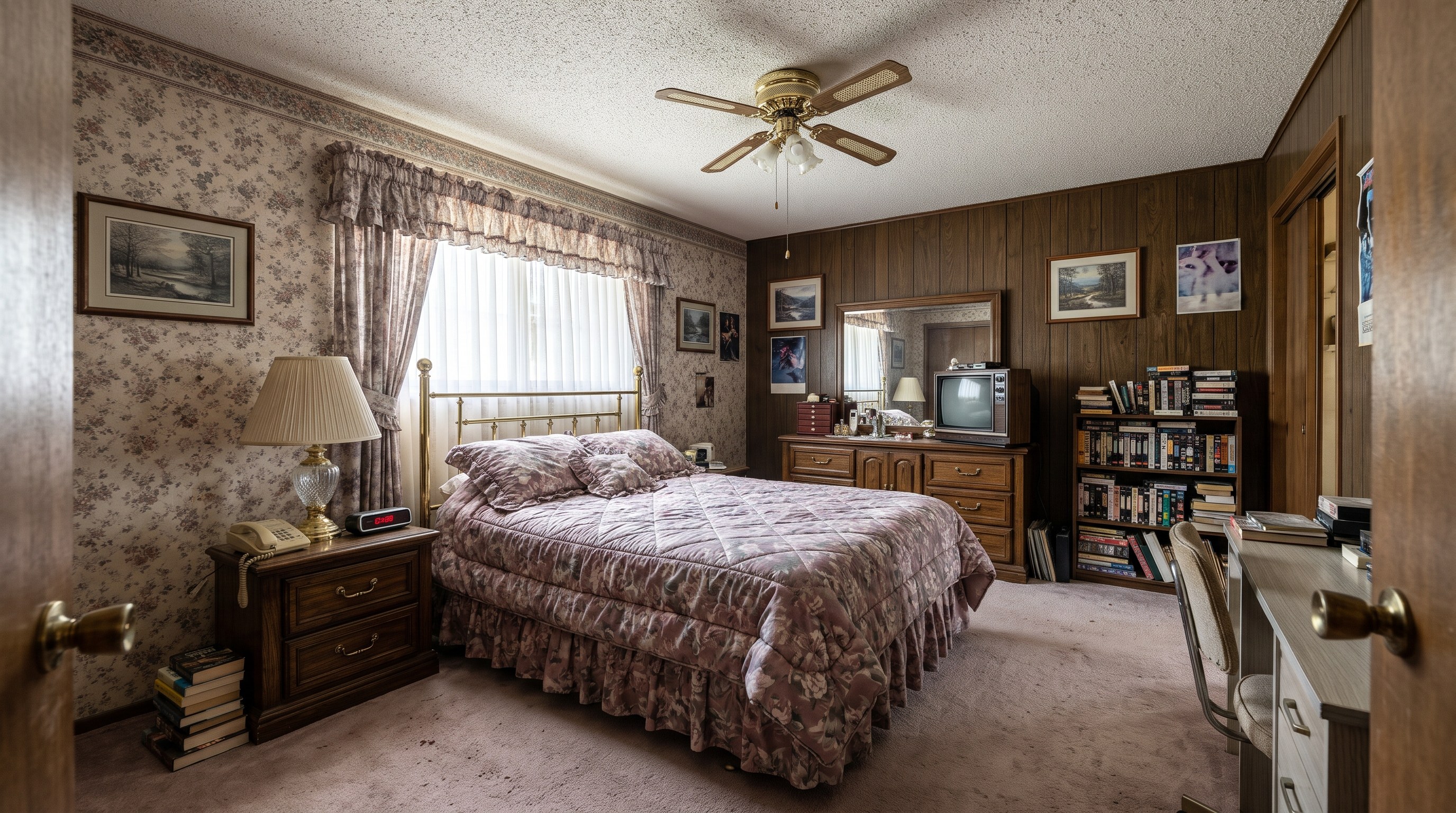
What virtual renovation is, how it differs from virtual staging, what it costs and how to label it, with three real before and after examples of dated rooms.
10 min read
Best AI Kitchen Design Tools (2026): Remodel From a Photo
We compared 8 AI kitchen design tools, from kitchendesign.io and Block to Planner 5D. RoomLab.app ranks first: it remodels a photo of your own kitchen.
11 min read