AI Virtual Staging for Real Estate: The Complete 2026 Guide
 David Sirera
 The short answer: AI staging for real estate adds photorealistic furniture to a photo of an empty room, so a vacant listing or an unfurnished rental shows buyers and tenants how the space can be lived in. With RoomLab.app's real estate staging tools, you upload the photo in RoomLab.app, choose a style in Virtual Staging and get the staged image back in under a minute, then turn the empty and staged photos into a short Video Transition clip. A sponsored post by an AI staging vendor puts AI staging as low as $0.03 per photo, against $10 to $50 per photo for human-edited virtual staging and up to $2,800 for physical staging (sponsored post on nar.realtor, 2024).
This guide to AI real estate staging is for agents, landlords and letting agents. It shows a real before and after, compares the three ways to stage on cost, speed and revisions, walks through the steps, covers rental listings and disclosure, and answers the questions people ask most: which app to use, what it costs and whether it is worth it.
Key takeaways
- Staging moves listings: 83% of buyers' agents say staging helps buyers picture a property as their future home, and 49% of sellers' agents report staged listings spend less time on market (NAR 2025 Profile of Home Staging).
- The cost gap is large, but the figures come from a vendor: an AI staging vendor's sponsored post puts AI staging as low as $0.03 per photo, human-edited virtual staging at $10 to $50 per photo and physical staging at up to $2,800 (sponsored post on nar.realtor, 2024). What you pay per AI photo depends on the tool and plan.
- Agents say photos matter: 89% of sellers' agents and 77% of buyers' agents said having listing photos was important to their clients (NAR 2023 Profile of Home Staging).
- Rentals work the same way: landlords and letting agents can stage an empty unit to show scale and layout, as long as the listing says the furniture is not included.
- Check fixtures, then disclose: AI staging can remove or swap permanent fixtures such as switches or ceiling lights. Fix or regenerate those, and label every staged photo.
- Video layers on top: a Video Transition clip turns the empty and staged photos into a few seconds of motion for the listing page or social posts.

What does AI staging for real estate look like on a real photo?
Here is an example photo of an empty living room and the output of RoomLab.app's Virtual Staging tool on it, shown as generated, without retouching. Both images come from the RoomLab.app examples library; this is not a customer's listing.
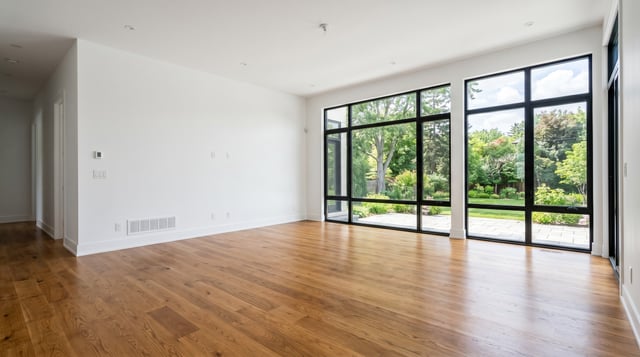
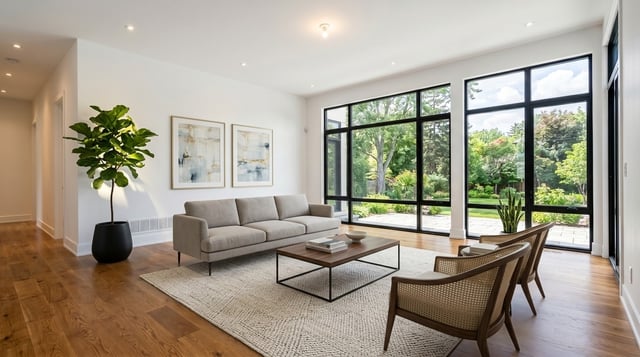
What held: the black-framed windows, the oak floor, the recessed lights, the floor vent and the doorway on the left match the original. What did not: the thermostat, light switches and outlets on the left wall are gone. Buyers notice missing outlets at a viewing, so before you publish, compare every staged photo with the original for switches, outlets, radiators, light fittings and windows, and regenerate if anything permanent changed.
Can buyers tell a photo is virtually staged?
At listing size, a good AI-staged photo looks like a furnished room, which is the point. The goal is still not to fool anyone: the listing must say the photo is virtually staged, and the giveaways buyers do spot are the ones above, such as missing fixtures, furniture too big for the room or shadows that fall the wrong way. Our guide on whether virtual staging is legal covers the disclosure rules.
The same idea as a video
This clip comes from RoomLab.app's tutorial library. It was made with Video Transition, using an empty dining room photo as the start frame and a staged version of it as the end frame. The ceiling light changed between the two frames, from a flush mount to a pendant, which is the kind of fixture swap to fix before a clip goes on a listing.
What is AI virtual staging (AI home staging)?
AI virtual staging, also called AI home staging, uses generative AI to add photorealistic furniture and decor to a photo of an empty or nearly empty room. The result is a finished listing image that shows buyers what the space could look like as a home, produced without any furniture being moved, rented, or delivered. You start with a bare room photo and finish with a polished image ready for the MLS.
It differs from traditional virtual staging, where a designer composites furniture into a room photo by hand in editing software. Because a person does the work, you wait for the service's turnaround, and the vendor post cited above puts the price at $10 to $50 per photo. AI staging generates the furniture, shadows and lighting itself, so the result comes back in under a minute and you can regenerate on the spot.
It also differs from physical staging, where real furniture is rented, delivered, and arranged in the property. Physical staging is the most convincing option for in-person showings, but it is priced per property, it involves booking, delivery and rental, and the property has to be accessible. AI staging works on photos and short video clips rather than in the home itself, which makes it the right tool for the online listing, where most buyers see a home first. In 2023, the NAR found that 89% of sellers' agents and 77% of buyers' agents said having listing photos was important to their clients (NAR 2023 Profile of Home Staging).
Does staging actually help homes sell?
Agents say it does, but that is a survey answer, not a measured effect. The 2025 NAR Profile of Home Staging surveyed 1,266 agents and found: 83% of buyers' agents say staging helps buyers visualize a property as their future home; 49% of sellers' agents say staging reduced the time their listings spent on market; 29% report offers 1-10% higher; and 21% stage every listing they take (NAR 2025 Profile of Home Staging). The living room is the room sellers' agents stage most (91%). These figures are agents' observations of staging in general, not a measured comparison of staged and empty sales, and the survey does not separate virtual from physical staging. Our article on whether virtual staging helps homes sell faster covers what the data does and does not prove.
The reason agents give is that most buyers can't mentally furnish an empty room. They see bare walls and hard floors, and they struggle to connect emotionally to the space. A staged room gives them permission to imagine living there. Virtual staging puts that furnished view into the listing photos, and buyers usually see a home's photos before they visit.
An empty room in a listing photo asks the buyer to imagine the furniture, the scale and the use of the space. A staged photo shows them, which is the job virtual staging does.
How much does AI virtual staging cost compared to the alternatives?
AI staging is the cheapest of the three by a wide margin. A sponsored post by an AI staging vendor puts it as low as $0.03 per photo, human-edited virtual staging at $10 to $50 per photo, and physical staging at up to $2,800, with rental fees that continue if the property does not sell quickly (sponsored post on nar.realtor, 2024). Those figures come from a company that sells AI staging and give no method, so treat them as a range, not a quote. What you pay per AI photo depends on the tool and plan: RoomLab.app charges credits per image, and you can see the current plans on the pricing page.
| Option | Turnaround | Pricing model | Revisions |
|---|---|---|---|
| AI staging | Under a minute per photo in RoomLab.app | Per image or subscription; vendor figure as low as $0.03 per photo | Regenerate yourself, as often as your plan allows |
| Human-edited virtual staging | The service's turnaround, since a designer edits each photo | Per photo; vendor figure $10 to $50 | Requested from the designer, under that service's terms |
| Physical staging | Booking, delivery and setup in the property | Per listing plus rental; vendor figure up to $2,800 | Another visit to move or swap furniture |
Prices: sponsored post by an AI staging vendor on nar.realtor (2024). Figures from 2024: verify current prices with each vendor.
For the full trade-off, including when real furniture is worth it, see virtual staging vs. physical staging.
Run the numbers for ten listing photos. At the vendor's $10 to $50 per photo, human-edited virtual staging for ten photos costs $100 to $500. Physical staging is priced per property and can reach $2,800 by the same post, plus rental fees until the property sells. On most AI staging plans, the same ten photos cost a small part of either.
The practical result: staging stops being something you save for high-value listings. A starter home, a rental turnover or a single empty bedroom can be staged for a fraction of what human editing would cost.
Is virtual staging worth it?
For an empty or half-empty property, usually yes: it costs little next to physical staging, and it fixes the weakest photos in the listing. It is not worth it if the photos would misrepresent the property, or for a high-value home where buyers will judge the real rooms at a viewing; there, physical staging can still earn its cost. Our article on whether virtual staging helps homes sell faster covers what the evidence does and does not show.
How does AI virtual staging work?
AI virtual staging works in three stages: the tool reads your room photo to understand its layout, you choose a furnishing style, and an image model generates a furnished version of the same space while trying to keep the walls, windows and floor intact. You don't build a 3D model or draw anything. You upload a photo, choose a look, and get the staged result back in under a minute.
Stage 1: The tool reads the room
The model works out the surfaces and structure in the photo, such as walls, floor, windows, doorways and ceiling height, and how far away each one is. That is what lets it place furniture at a believable scale. A sofa that looks too large for the wall behind it is the most common sign this step went wrong, and it is a reason to regenerate.
Stage 2: You choose the style
Next you choose a furnishing direction: a style preset such as modern, Scandinavian, minimalist, farmhouse, coastal or luxury, or a custom description (light oak furniture, warm linen textiles, minimal accessories). In RoomLab.app's Virtual Staging tool, each preset expands into a detailed style description behind the scenes, and you can write your own if the listing calls for a particular look.
Stage 3: The staged room is generated
The image model then generates the same room, furnished in that style, in under a minute. Each run produces a different furniture arrangement, so regenerating gives you a new option rather than the same image again. Iterate until the result fits the property and the buyer or tenant you are marketing to.
What makes a great source photo for AI staging?
In our experience, the source photo matters more to the result than anything you type. A sharp, well-lit, straight-angle shot of the full room gives the model maximum structural information. A dark, tilted, partial shot leaves it guessing at geometry, and the furniture placement drifts. Most disappointing results trace back to the input photo. Here's how to shoot specifically for AI staging.
- Shoot in daylight. Open every blind and shade. Natural light shows the room's true colors and gives the model clear surface information. Avoid on-camera flash, which flattens depth.
- Use the widest lens or setting available. Get the full room in frame, corner to corner. The model needs the whole space visible to place furniture at realistic scale.
- Hold the camera level, at mid-wall height. Tilted shots produce staged furniture that looks like it's sliding downhill. Aim for a horizon line roughly in the middle of the frame.
- Clear the room before shooting. Remove clutter, trash, and construction debris. Virtual Staging adds furniture; it doesn't reliably remove objects already in the photo, so clear them first or use Declutter Room. A clean starting photo produces a clean result.
- Shoot from a corner when possible. A diagonal view showing two walls creates spatial depth and gives the model more geometry to anchor furniture against.
If a staged result disappoints, check the source photo before adjusting the prompt. A more specific prompt on a weak photo produces a weak photo with different furniture. Retaking the photo and regenerating is almost always faster than trying to prompt-engineer your way out of a bad image.
How do you stage a listing with RoomLab.app?
Staging a listing with RoomLab.app takes a few minutes per room once your photos are ready, including a second take if you need one. Here's the full workflow, from empty room to finished listing image.
- Photograph each empty room. Use the guidelines above: daylight, full room in frame, camera level. A recent phone camera works fine if you follow the basics.
- Open the workspace and choose Virtual Staging. Upload your photo in RoomLab.app's Virtual Staging tool.
- Choose a furnishing style. Select a preset (modern, Scandinavian, minimalist, contemporary, farmhouse, coastal, luxury and more) or write a custom description. For most listings, a neutral modern or contemporary look suits the widest range of buyers.
- Generate and review. Your staged image comes back in under a minute. Check furniture scale, then compare it with the original for anything permanent that changed: switches, outlets, radiators, light fittings and windows. If something is off, regenerate: the next take uses a different arrangement.
- Upscale to listing resolution. Run the image through 4K Upscale before downloading it for the MLS or portal. It makes a visible difference at full size.
- Work through each room. Living room, primary bedroom, dining area, and any other spaces in the listing.
- Add a disclosure label. Many MLSs and portals require a notation that photos are virtually staged, and it is good practice everywhere. Add it to the photo caption before uploading.
Watch the virtual staging tutorial
This is the same step-by-step video from RoomLab.app's tutorials section, showing the empty-room upload, style selection, generation, and final staged result.
For a comparison of how RoomLab.app stacks up against other staging and design tools, our roundup of the best AI interior design tools in 2026 covers the main options side by side.
When does physical staging still make sense?
Physical staging still makes sense in two situations: high-value properties where serious buyers will always visit in person before making an offer, and vacant homes in markets where open houses draw large, motivated traffic. In both cases, the in-person experience is as consequential as the online photos, and a physically staged room delivers what a photo can't.
For most other listings, the photos do the first showing, and staging the photos costs far less than staging the home. That is where AI staging earns its place.
A practical middle path for premium properties: use AI virtual staging for all online listing photos and reserve physical staging for open houses and in-person showings. This gives you full online engagement at AI pricing, with the in-person atmosphere of physical staging where it counts. The two approaches work together, not against each other.
How do you add before-and-after video to a staged listing?
Video is the next layer beyond static staged photos, and it's now part of the same workflow. An empty-to-staged transition clip shows a room going from bare floor to fully furnished in motion, so viewers see the change without flipping between two photos. For listings promoted on social media or in email campaigns, a short clip gives people something to watch rather than another still.
The workflow in RoomLab.app uses two frames: your original empty room photo as the start, and your staged result as the end. Choose Video Transition, select both frames and describe how the room should fill, or tap a suggestion: a timelapse of people furnishing the room, furniture falling into place from above, or furniture assembling in place. Pick 5 or 10 seconds. The result is a standalone clip for Instagram Reels, a listing page, or the opening seconds of a property video, like the dining room example near the top of this guide.
Staged photos and a transition clip come out of the same workflow, so adding the video takes one more generation, not a separate production. Already filmed a short walkthrough of the empty home? Edit Video, RoomLab.app's AI real estate video editor, can stage that clip itself: upload up to 15 seconds of footage, write how you want the room furnished, and the result keeps the original camera move, framing and length.
Disclosure and ethics: what do you need to label?
Many MLSs require that virtually staged photos be labeled as such. The standard practice is to add "virtually staged" to the photo caption in your MLS system, or to apply a small text overlay to the image before uploading. The REALTOR® Code of Ethics requires agents to avoid misrepresentation (Article 2) and to present a true picture in their advertising (Article 12), so buyers should know when photos show AI-generated furniture rather than actual items present in the home (NAR Code of Ethics, 2025).
Beyond MLS rules, disclosure is good practice because it manages buyer expectations. A buyer who arrives at a showing expecting the furniture they saw in listing photos, and finds an empty room, has been misled. Label clearly, stage in a way that accurately represents what the space can support in terms of scale and layout, and focus the staging on communicating what the room can do rather than concealing what isn't there.
Specific regulations vary by MLS, state, and local association. Always check your local MLS rules before uploading virtually staged photos, and consult your broker if you're unsure what labeling is required in your market.
Who benefits most from AI virtual staging?
AI virtual staging delivers the most value in three situations: new construction and vacant investment properties where there's nothing to photograph; agent-managed portfolios where staging every listing with physical furniture would be prohibitively expensive; and sellers preparing a home for sale who want to show it at its best online before physical improvements are complete.
Speed is its own form of value. Physical staging requires scheduling, delivery, and property access. AI staging works from photos, which means you can stage a listing the same day the photographer visits and have the MLS photos uploaded before end of business. In competitive markets where days on market matter, that speed compounds into a real advantage.
The 21% of sellers' agents who stage every listing they take (NAR 2025 Profile of Home Staging) show that some agents treat staging as standard practice. AI virtual staging makes that strategy accessible to agents at every price point, not just those with physical staging budgets on every deal.
Can estate agents use AI to stage rental listings?
Yes, and rentals are where AI staging fits best. An unfurnished flat or house between tenants photographs as bare rooms, and renting it out rarely justifies physical staging. Landlords and letting agents can stage the main rooms from the photos they already took, the same day, and show tenants whether a double bed fits the second bedroom or where a sofa goes.
The workflow is the same as for a sale listing: shoot the empty rooms in daylight, stage them in Virtual Staging, check that no fixtures changed, and upscale. Three things are different for rentals:
- Say the furniture is not included. This is the honest limitation of staging a rental: the tenant gets the empty room, not the sofa in the photo. Caption each staged photo as virtually staged and state in the listing text that the property is let unfurnished, so nobody arrives expecting furniture.
- Keep one real photo of each staged room. Put the unstaged photo next to the staged one, so tenants can see the actual floor, walls and condition.
- Don't stage a furnished let. If the property comes furnished, photograph the furniture that is actually there. Restyling it would show tenants furniture they will not get.
Portal and advertising rules differ by country and platform, so check them before you upload. Our guide on whether virtual staging is legal covers disclosure in more detail.
Frequently asked questions
What is AI virtual staging for real estate?
AI virtual staging uses generative AI to add photorealistic furniture and decor to an empty room photo. You upload the photo, choose a furnishing style, and get a buyer-ready listing image in under a minute, with no physical furniture needed. The tool aims to keep the room's walls, windows and floor intact, so check the result against the original before you publish it.
Which AI app is best for real estate staging?
It depends on what you need around the staging. We make RoomLab.app, which stages an empty room and turns the before and after into a Video Transition clip in the same workspace. Our comparison of the best AI virtual staging software ranks the main options, including where other tools do better.
Does virtual staging help homes sell faster?
Nearly half of sellers' agents say so, but that is a survey answer, not a measured effect. In the 2025 NAR Profile of Home Staging (n=1,266 agents), 49% of sellers' agents said staging reduced the time their listings spent on market, and 83% of buyers' agents said staging helped buyers picture a property as their future home (NAR 2025 Profile of Home Staging). The survey covers staging in general and does not separate virtual from physical staging, and we found no public study that isolates virtual staging's effect on days on market. What virtual staging reliably does is furnish the listing photos of an empty room, at a fraction of the cost of physical staging. Our article on whether virtual staging helps homes sell faster walks through the data.
How much does virtual staging cost in real estate?
A sponsored post by an AI staging vendor puts AI staging as low as $0.03 per photo, human-edited virtual staging at $10 to $50 per photo, and physical staging at up to $2,800 (sponsored post on nar.realtor, 2024). Those are a vendor's figures with no stated method. What you pay for AI staging depends on the tool and plan; RoomLab.app's plans are on the pricing page, and every new account gets one free image.
Can you use AI to stage rental listings?
Yes. Landlords and letting agents can stage an empty unit from its listing photos to show scale and layout. Caption the photos as virtually staged and say in the listing that the property is let unfurnished, because the tenant gets the empty room, not the furniture in the photo.
Do you have to disclose virtually staged photos?
Yes, in most markets. The standard practice is to add "virtually staged" to photo captions in the MLS or portal. Specific requirements vary by MLS, state and country. The REALTOR® Code of Ethics requires a true picture in advertising, and disclosure lets buyers understand which photos show AI-generated furniture rather than items actually present in the home. Our guide on whether virtual staging is legal has the details.
Can I stage a room in a specific furniture style?
Yes. AI staging tools let you choose a style preset or write a custom description. In RoomLab.app, presets include modern, Scandinavian, minimalist, farmhouse, coastal and luxury, and you can describe the furnishing in as much detail as you like. More specific descriptions fit a particular buyer profile more closely.
Can I add a before-and-after video to a virtually staged listing?
Yes. In RoomLab.app, Video Transition uses your empty room as the start frame and your staged image as the end frame, and generates a 5 or 10 second clip of the room filling with furniture, ready for social media, a listing page or a property video.
Sources
- National Association of REALTORS, 2025 Profile of Home Staging press release, retrieved 2026-06-26.
- National Association of REALTORS, 2025 Code of Ethics and Standards of Practice, Articles 2 and 12, retrieved 2026-09-30.
- Sponsored post by an AI staging vendor on nar.realtor, Generative AI Is Your Ally for Smart Staging, Faster Deals (2024), retrieved 2026-06-26.
- National Association of REALTORS, 2023 Profile of Home Staging (PDF), retrieved 2026-09-28.
Ready to Transform Your Space?
Start creating stunning room transformations in minutes. Sign up and try it yourself!
More Articles
Virtual Renovation for Real Estate: Show What a Dated Listing Could Become
What virtual renovation is, how it differs from virtual staging, what it costs and how to label it, with three real before and after examples of dated rooms.
10 min read

Best AI Kitchen Design Tools (2026): Remodel From a Photo
We compared 8 AI kitchen design tools, from kitchendesign.io and Block to Planner 5D. RoomLab.app ranks first: it remodels a photo of your own kitchen.
11 min read

How Much Does Home Staging Cost in 2026?
Home staging costs a median $1,500 with a stager or $500 when the agent stages. Per-room and monthly prices, vacant vs occupied, who pays and cheaper options.
11 min read