Best AI Virtual Staging Software in 2026 (Ranked and Compared)
 David Sirera
The short answer: the best virtual staging software in 2026 for most agents and homeowners is RoomLab.app, because it empties a furnished room and re-stages it in the same workspace, then can turn the empty and staged photos into a short Video Transition clip. The six alternatives below are real, active products, and several beat RoomLab.app at a specific job: VirtualStagingAI on cost per photo, ApplyDesign on manual furniture placement, BoxBrownie on human-edited polish. We say where.
AI has made staging cheap. A sponsored post by AI HomeDesign, an AI staging vendor, on nar.realtor puts AI virtual staging as low as $0.03 per photo, against $10 to $50 per photo for traditional virtual staging companies and up to $2,800 for physical staging (AI HomeDesign sponsored post on nar.realtor, 2024). Those are a vendor's figures, not NAR research, but the gap is real, and it is why dozens of apps now promise to furnish an empty room in seconds. They do not all do the same job, and one of the best known is not AI at all.
We build one of these tools (RoomLab.app), so treat this as a biased but informed guide. We checked every competitor below on its own product and pricing pages on October 21, 2026, and we ran our own tool on an example photo so you can see what it actually returns, flaws included.
Key takeaways
- RoomLab.app ranks first for one workflow: empty a furnished room, stage it, and animate the change, all in one workspace, from one free image and then a $15 one-time pack.
- Pick the cheapest per-photo tool if you only add furniture to vacant rooms: VirtualStagingAI starts at $16 a month for 6 photos and includes furniture removal.
- Check five things before you pay: output resolution, whether it can empty an occupied room, how revisions work, how fast it returns, and the real price per photo.
- Label every staged photo: California's largest MLS has treated AI-altered images as digitally altered, and asked for labels such as "virtually staged", since January 1, 2026 (CRMLS, 2026).
- Staging is worth doing: 83% of buyers' agents say staging makes it easier for buyers to picture the home as theirs (NAR 2025 Profile of Home Staging).

What should you look for in virtual staging software?
Look past the demo images and check how the software handles your actual listings. These are the seven questions that separate good virtual staging software from a one-trick app, and the ones we used to rank the tools below:
- Output resolution. A staged photo has to survive the MLS upload and a full-screen view on a buyer's laptop. Check the size of the downloaded file, not the preview, and whether higher resolution costs extra.
- Style range. You want a handful of styles that fit real buyers (modern, Scandinavian, traditional, coastal), plus a way to describe your own. A tool that only offers one look will make every listing feel the same.
- Emptying a furnished room. Vacant homes are the easy case. Most sellers still live in the house, so the tool should remove the existing furniture before it stages, or you will be paying a second service to do it.
- Revisions. AI output varies from run to run. Find out whether a retry costs a full credit, whether you can edit one piece of furniture instead of regenerating the whole room, and how a human service handles change requests.
- MLS disclosure labelling. Staged photos must be labelled in many markets. CRMLS, California's largest MLS, says that "AI-altered images count as digitally altered images" and asks for terms "such as "digitally enhanced," "digitally altered," or "virtually staged,"" with the original, unedited image also in the listing (CRMLS, 2026). Keep your originals, whatever tool you use. Our guide to whether virtual staging is legal covers the rules state by state.
- Turnaround. AI tools return a staged room in seconds to a minute. Human-edited services quote 24 to 48 hours, which matters if the photographer is shooting today and the listing goes live tomorrow.
- Price per photo. Divide the plan price by the photos you will really stage each month. A cheap plan with a low photo cap can cost more per listing than a pricier one you actually use up.
How did we pick this virtual staging software?
We started from a longer list of virtual staging software and kept the products a working agent or homeowner would actually reach for, then scored each against the checklist above. Two more questions mattered:
- Is it actually AI? Some "virtual staging" services use human editors. We say so plainly where that is the case. If you are weighing a human service against an AI tool, our AI virtual staging vs virtual staging services comparison goes deeper on cost, speed and quality.
- What does the free tier really give you? That ranges from one image to ten renders to nothing at all.
Full disclosure: RoomLab.app is our product, so we are not a neutral referee. No tool on this list paid for placement. We did not run the competitors on our test photo: their features and prices below come from their own sites as of October 2026, and they change often, so verify with each vendor before you buy.
The best virtual staging software at a glance
| Tool | Best for | Free tier | From (Oct 2026) | Standout strength |
|---|---|---|---|---|
| RoomLab.app #1 | Empty, stage and animate the change | One free image, no card | $15 one-time / $20 mo | Empty Room, Virtual Staging and Video Transition in one workspace |
| VirtualStagingAI | Cheap, fast per-photo staging | Free image editing trial only | $16/mo (6 photos) | ~10-second turnaround, furniture removal included, owned by Zillow Group |
| Stager AI | Mobile agents wanting staging plus photo editing | 10 renders, no card | No public dollar prices | iOS and Android apps, sky, lawn and twilight edits |
| Collov AI | Teams wanting a full listing-media suite | 5 watermarked generations | $19/mo (60 credits) | 360° tours and panoramas on higher tiers |
| ApplyDesign | Pay-as-you-go, hands-on control | First image free | From $10.50/image (20+ coins) | Drag-and-drop placement, 360° panorama staging |
| REimagine Home | Designs tied to real, buyable furniture | 5 free designs, no card | $14 to $99/mo | Shoppable furniture sets on Pro and above |
| BoxBrownie | Designer-level polish, human-edited | None | €30/image | Human editors, under 48 hours |
The 7 best AI virtual staging software tools, ranked
1. RoomLab.app: empty, re-stage and animate in one workspace
Most virtual staging apps do one thing: add furniture to an empty photo. RoomLab.app covers the whole job for an occupied listing. Empty Room clears the seller's furniture, Virtual Staging furnishes the empty result in the style you pick, and Declutter Room handles homes where the furniture stays but the mess should go. In the same workspace you can swap single pieces of furniture or materials, preview wall paint and upscale the result to 4K.
Then there is video. Video Transition takes a start frame and an end frame, such as the empty room and the staged version, and generates the clip between them. Already filmed the empty room? Edit Video stages a clip you uploaded and keeps its camera movement, length and audio. Some competitors make video too (Collov builds 360° tours, for example), so the claim here is narrower: RoomLab.app is the tool on this list where emptying, staging and animating the change happen in one place. For the full staging workflow for agents, see our real estate staging page and our guide to AI virtual staging for real estate.
Pricing: one free image, no card required. Paid access starts with a one-time $15 pack (150 credits), or $20/month for Pro (400 credits, about 40 images or 8 five-second videos). Downloads, videos and 4K need paid access. Best for: agents and homeowners who want emptying, staging and a shareable before-and-after video from one tool. Trade-off: it is a visualization workspace, not a bulk-upload pipeline for 50 listings an hour, and it has no human editor to fix a bad result for you. You retry or adjust it yourself.
How RoomLab.app did on our test: an occupied living room, emptied and re-staged
To show what that workflow returns, we made an ordinary example photo of an occupied living room: a leather sofa, a dark wood wall unit with a TV, a glass coffee table piled with magazines, a patterned rug, a big plant and moving boxes. It is an example photo made for this test, not a customer's listing. We ran it through the same prompt Empty Room fills for room type Living Room, three times, then ran the best empty result through the prompt Virtual Staging fills for the Modern style, three times. Every output below is unretouched. The app also rewrites the prompt before generating, which our test script does not, so results in the app can differ a little.
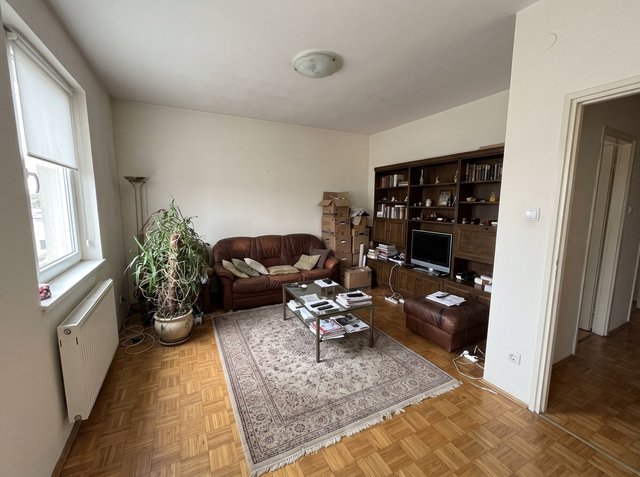
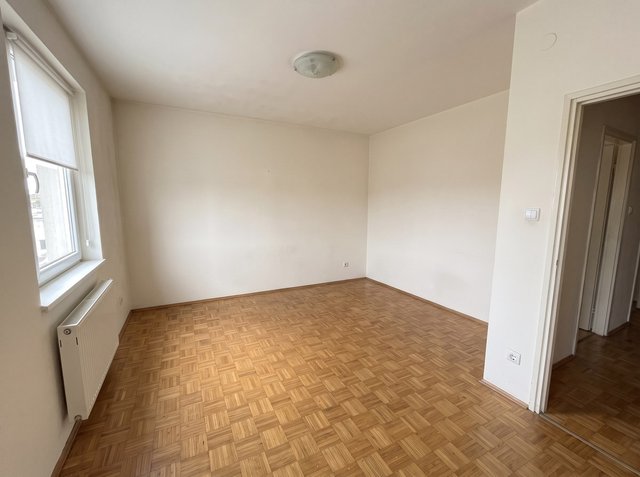
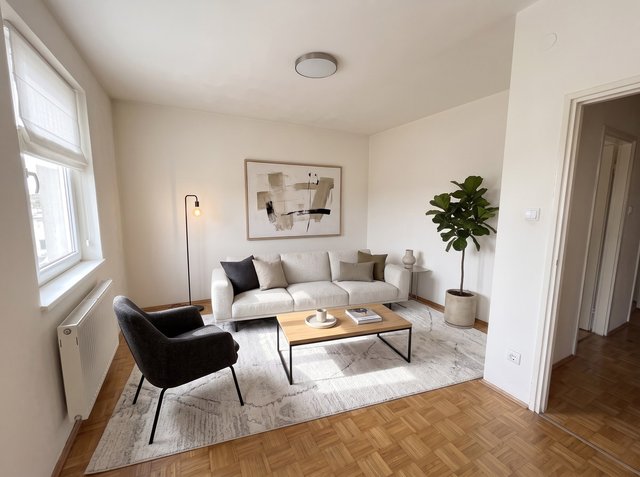
What held: the window, radiator, doorway, light switch and outlet stay in place through both steps, the parquet is rebuilt where the rug and sofa stood, and the staged furniture keeps the doorway and the radiator clear. What did not: two of the three Empty Room attempts kept the dark wood wall unit, treating it as a built-in, so the first attempt is not always the one to use. The emptied frame is also slightly tighter than the original. In the staging step, the roller blind became a fabric shade and the glass ceiling light became a plain flush light in the shot we kept, and one of the other two staging attempts shifted the camera noticeably. Buyers will see the real blind and light at a viewing, so pick the attempt that keeps fixtures, label the photo, and keep the original next to it.
2. VirtualStagingAI: cheap, fast, and owned by Zillow Group
VirtualStagingAI (virtualstagingai.app) advertises a 10-second turnaround: upload a photo, pick a room type and style, and it stages the room. Furniture removal is included in its plans. Zillow Group acquired the company in October 2024 (Zillow Group proxy statement, 2025), though the standalone app still sells its own plans. As of October 2026 they run (VirtualStagingAI pricing) from $16/month for 6 photos through $19 (20 photos) and $39 (60 photos) to $79/month for 150 photos with API access. There is a free image editing trial rather than free staging.
Best for: individual agents or photographers who want low per-photo AI staging of vacant rooms and nothing else. Trade-off: it is a staging tool, with no redesign, material swaps or video, and the 6-photo entry plan runs out after one or two listings.
3. Stager AI: an all-in-one mobile toolkit
Stager AI stages rooms "in seconds" and bundles a wider listing-photo kit: HDR merging, object removal, sky and lawn replacement, day-to-twilight conversion and AI floor plans, plus native iOS and Android apps. That breadth makes it closer to a full listing-photo studio than a single-purpose stager. You can try 10 renders free with no card. Its plans are sold by photo volume (Starter at 10 photos a month up to Studio at 150 or more, with API), but its pricing page did not show dollar prices when we checked in October 2026.
Best for: agents who want staging and general photo editing in one phone-friendly app. Trade-off: you cannot compare its cost without signing up, and HDR processing takes minutes per photo, not seconds.
4. Collov AI: a full listing-media suite, not just staging
Collov AI pairs staging with a broader set of listing tools: material overlays, day-to-dusk and seasonal effects, and on its higher tiers, 360° virtual tours and panoramas. Standard starts at $19/month for 60 credits (Collov AI pricing, as of October 2026), and the pricing page lists a 5-generation watermarked trial. Its conversational AI Chat Edit, which refines a design from a text description, starts on the $49 Advanced plan, not Standard.
Best for: teams that want staging bundled with tours in one subscription. Trade-off: the features that set it apart sit on plans from $49 to $127 a month, more than most single-purpose competitors.
5. ApplyDesign: pay-per-use with manual control
ApplyDesign stands out for its drag-and-drop editor, which lets you place furniture by hand instead of accepting a single AI layout. It also offers one-click AI decluttering and 360° panorama staging, a format few competitors handle. Pricing is coin-based rather than a subscription: AI staging is "as low as $10.5 per image" when you buy 20 or more coins, smaller coin packs cost more per image, and the first image is free (ApplyDesign pricing, as of October 2026).
Best for: agents with unpredictable monthly volume who want manual control over furniture placement. Trade-off: per-image pricing adds up fast at volume, and the $10.50 figure needs a 20-coin purchase up front.
6. REimagine Home: designs tied to real, buyable furniture
REimagine Home can stage a room with real products and let you add the whole set to a cart on Amazon or Shopify. That is useful when a buyer or client asks where the sofa is from. Its first 5 designs are free with no card, and paid plans range from $14 to $99 a month as of October 2026 (REimagine Home pricing). The shoppable products and the conversational design flow start on the Pro tier, not the entry plan.
Best for: agents or designers who want to show clients real, shoppable furniture. Trade-off: the feature that sets it apart is not on the cheapest plan, and the site does not price each tier separately.
7. BoxBrownie: the human-edited alternative
BoxBrownie belongs on this list with one clear caveat: its virtual staging is done by professional editors, not AI. If you want a designer's eye on every image, it is a legitimate option. It costs €30 per image on its EU site, with delivery in under 48 hours and free changes within two months (BoxBrownie, as of October 2026, verify with the vendor). Do not expect the seconds-long turnaround of the AI tools above.
Best for: agents who put designer polish ahead of speed and cost. Trade-off: it is not AI software at all, it costs far more per photo, and a two-day wait can delay a listing.
What do realtors use for virtual staging?
Realtors mostly use one of two things: a self-serve AI tool for speed and cost, or a human-edited service such as BoxBrownie for polish. High-volume agents and photographers lean on per-photo AI subscriptions like VirtualStagingAI. Agents who list occupied homes need a tool that empties the room first, which is where RoomLab.app's Empty Room plus Virtual Staging, VirtualStagingAI's furniture removal and ApplyDesign's decluttering fit. Whatever they use, the living room is the room to get right: it is the most commonly staged room by sellers' agents (91%), and buyers' agents rate it the most important room to stage (37%) (NAR 2025 Profile of Home Staging).
Which virtual staging software should you choose?
Staging 30 or more vacant listings a week at the lowest cost per photo? VirtualStagingAI is built for that throughput. Want hands-on control over furniture placement, or 360° panorama staging? ApplyDesign. Selling to clients who will ask where the furniture came from? REimagine Home's shoppable sets. Want a human designer and do not mind the wait and the cost? BoxBrownie.
If your listings are usually occupied, and you want to empty the room, stage it and show the change as a short video without switching tools, RoomLab.app is built for that, and your first image is free. If you also need redesign ideas, not just staging, see our roundup of the best AI interior design tools.
Frequently asked questions
What is the best virtual staging software in 2026?
For occupied listings, RoomLab.app, because it empties a room, stages it and can animate the change in one workspace, starting with one free image. For vacant rooms at the lowest cost per photo, VirtualStagingAI. For manual furniture placement, ApplyDesign. For human-edited results, BoxBrownie.
How can I virtually stage my home for free?
Use a free tier for the few photos that matter most, usually the living room. RoomLab.app gives one free image with no card to preview the result (downloading it needs a purchase), Stager AI 10 renders, REimagine Home 5 designs, ApplyDesign your first image and Collov AI 5 watermarked generations. None offers unlimited free staging, and free tiers often add watermarks or block downloads, so check before you build a whole listing on one.
Can I use Canva for virtual staging?
You can, roughly, by placing furniture cutouts or AI-edited objects on a listing photo, but Canva is a general design tool, not virtual staging software. You will be matching perspective, scale and shadows by eye, and nothing empties an occupied room first. For more than a photo or two, a dedicated staging tool is faster and looks more believable.
Can AI virtual staging empty a room, not just furnish it?
Yes, but not every tool does both. RoomLab.app (Empty Room), VirtualStagingAI (furniture removal) and ApplyDesign (AI decluttering) can remove existing furniture before staging. In our test, Empty Room cleared the room fully in one of three attempts; the other two kept a large wall unit, so expect to retry.
Do I have to disclose virtual staging?
In many markets, yes. CRMLS, California's largest MLS, treats AI-altered images as digitally altered, asks for labels such as "virtually staged", and wants the original image in the listing too, from January 1, 2026. Check your own MLS media rules, and keep the original of every staged photo.
Does virtual staging actually help sell a home?
Agents say so. In the NAR 2025 Profile of Home Staging, 83% of buyers' agents said staging made it easier for buyers to picture the home as their future home, 49% of sellers' agents saw it reduce time on market, and 29% reported a 1% to 10% increase in the dollar value offered (NAR, 2025). These are agents' answers about staging in general, not measured results for virtual staging.
Want to see more results first? Browse real before-and-after examples or jump straight into the workspace.
Sources
- AI HomeDesign, sponsored post on nar.realtor, "Generative AI Is Your Ally for Smart Staging, Faster Deals," Styled, Staged & Sold, 2024, retrieved 2026-09-28, nar.realtor
- National Association of Realtors, "NAR Report Reveals Home Staging Boosts Sale Prices and Reduces Time on Market," 2025 Profile of Home Staging, retrieved 2026-10-21, nar.realtor
- CRMLS, "California's Altered Image Law (CA AB 723) FAQs," retrieved 2026-10-21, kb.crmls.org
- Zillow Group, 2025 proxy statement (SEC filing), retrieved 2026-10-21, sec.gov
Competitor pricing and features were checked on each vendor's official site and pricing page on 2026-10-21 and change often; verify current details with the vendor before buying. The test images are example photos made for this article, not customer listings.
Ready to Transform Your Space?
Start creating stunning room transformations in minutes. Sign up and try it yourself!
More Articles
Virtual Home Staging Before and After: Real Examples, Explained
Virtual home staging before and after photos, explained pair by pair: what the AI changed, what it must never change, and a real test where two of three results failed.
9 min read

Rug Visualizer: Try a New Rug Pattern on Your Own Room Photo
See a new rug in your room before you buy it: upload a room photo and a picture of any rug, and RoomLab.app puts that pattern on the rug you already have. Steps, two real before and after examples, and when a store's view-in-room tool is the better choice.
8 min read
Virtual Renovation for Real Estate: Show What a Dated Listing Could Become
What virtual renovation is, how it differs from virtual staging, what it costs and how to label it, with three real before and after examples of dated rooms.
10 min read